





Quick Summary: Robot network configuration requires more than reliable Wi-Fi. Retailers need a clear process to verify connectivity across robot routes, validate security requirements, coordinate IT and robotics teams, and resolve deployment blockers. This guide provides a practical framework for documenting network requirements, assigning ownership, gathering test evidence, and approving retail robot deployments across multiple stores.
Key Takeaways
- A successful Wi-Fi connection does not prove deployment readiness. Retailers must validate the robot’s documented network dependencies and test conditions along its actual operating route.
- Every network requirement needs evidence and an owner. Record the specification, verification method, test result, responsible team, and approval status before deployment.
- Separate technical failures from approval delays. Distinguish connectivity issues from blocked access, missing vendor documentation, and pending security reviews to identify the correct next action.
- A store pilot should establish repeatable deployment criteria. Document the conditions that worked, the exceptions encountered, and the tests each subsequent location must pass.
- Go-live decisions should depend on verified acceptance criteria. Define required tests and approval responsibilities with the retailer’s IT team and robot provider rather than relying on a generic network speed test.
- Validate network readiness before deployment. Retailers working with a Kody Robot should confirm site-specific connectivity, access permissions, and network requirements before approving each location.
Why Robot Network Configuration Matters Before Retail Deployment
Robot network configuration determines whether a retail robot can connect reliably, access required services, receive software updates, and operate under store security policies. A working Wi-Fi signal alone does not confirm that every required service is reachable or that connectivity remains stable along the robot’s route.
Security is another part of network readiness, particularly when a robot provider needs access to connected systems. Verizon’s 2025 Data Breach Investigations Report found third-party involvement in 30% of analyzed breaches, up from roughly 15% the previous year. Although the report does not focus on retail robots, the finding reinforces the importance of reviewing vendor access and connected-system permissions before deployment. (Source: Verizon)
NIST’s Guide to Operational Technology Security recommends network segmentation and limiting communication to authorized connections while accounting for performance, reliability, and safety. (Source: NIST)
For retailers, reliable robotic network configuration starts with verified requirements, route-based tests, and clear ownership between store IT and the robot provider. The guide covers robot network requirements, robot Wi-Fi checks, security approvals, troubleshooting, and a practical network setup process for multi-store rollouts.
What Does Robot Network Configuration Actually Involve?
A retail robot can connect to Wi-Fi and still fail a deployment readiness check. The network may block a required service, device registration may remain pending, or the robot’s route may include areas with unstable connectivity. A successful connection alone cannot confirm operational readiness.
Network readiness also affects whether operational data reaches the systems used for in-store robot data collection, helping teams verify that required information can be captured reliably.
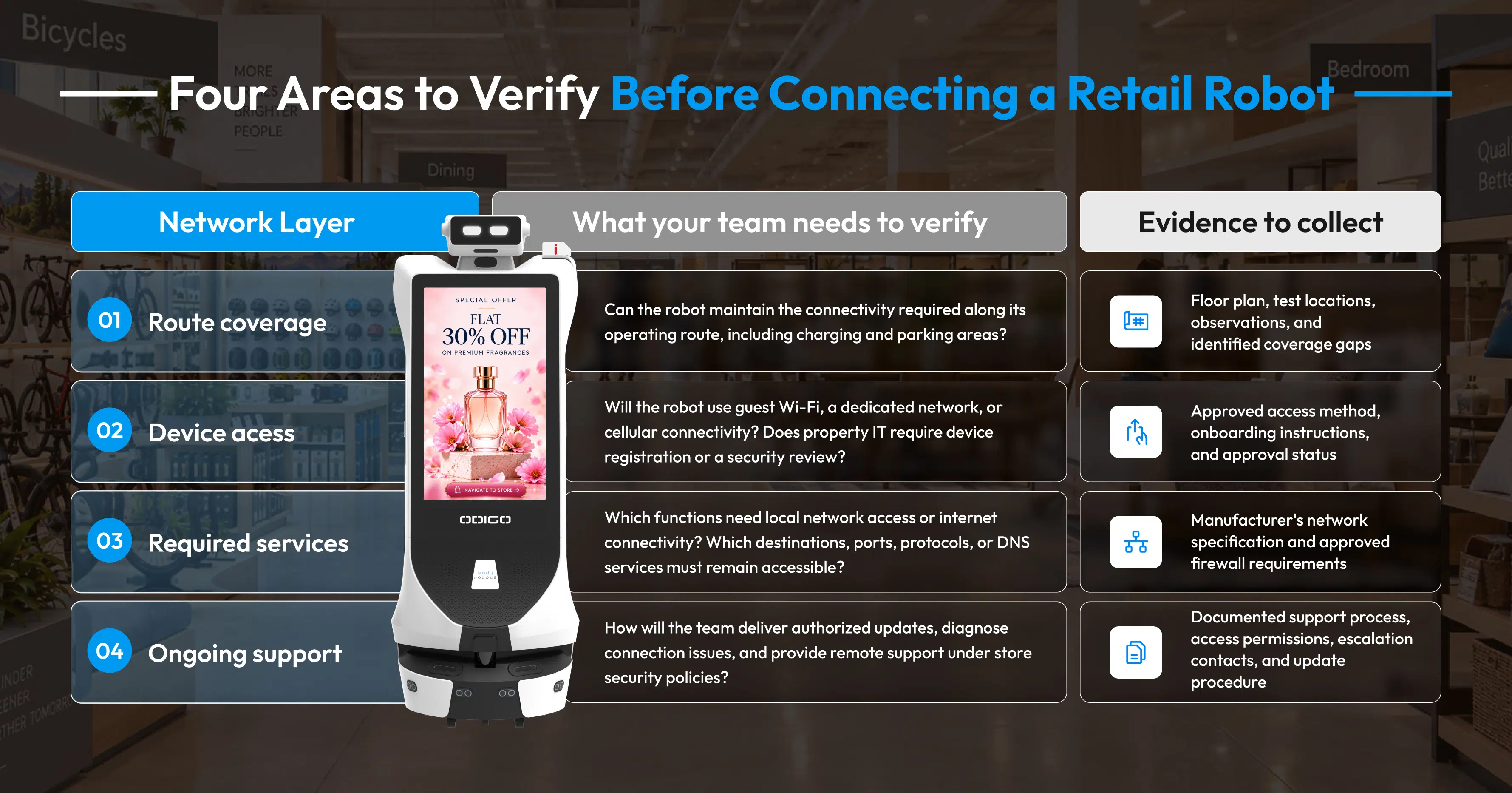
Robot network configuration involves four checks: route coverage, device access, required service connectivity, and ongoing technical support. Each check needs a clear owner and verifiable evidence before deployment approval.
Four Areas to Verify Before Connecting a Retail Robot
Before deployment, verify the network conditions that affect the robot’s operation, security, and support. Check route coverage, approved device access, required service connectivity, and ongoing technical support. Collect documented evidence for each area so your team can address gaps before go-live.
| Network layer | What your team needs to verify | Evidence to collect |
| 1. Route coverage | Can the robot maintain the connectivity required along its operating route, including charging and parking areas? | Floor plan, test locations, observations, and identified coverage gaps |
| 2. Device access | Will the robot use guest Wi-Fi, a dedicated network, or cellular connectivity? Does property IT require device registration or a security review? | Approved access method, onboarding instructions, and approval status |
| 3. Required services | Which functions need local network access or internet connectivity? Which destinations, ports, protocols, or DNS services must remain accessible? | Manufacturer’s network specification and approved firewall requirements |
| 4. Ongoing support | How will the team deliver authorized updates, diagnose connection issues, and provide remote support under store security policies? | Documented support process, access permissions, escalation contacts, and update procedure |
The exact requirements depend on the robot’s architecture and intended functions. Ask the manufacturer to confirm technical specifications rather than assuming every retail robot needs the same configuration.
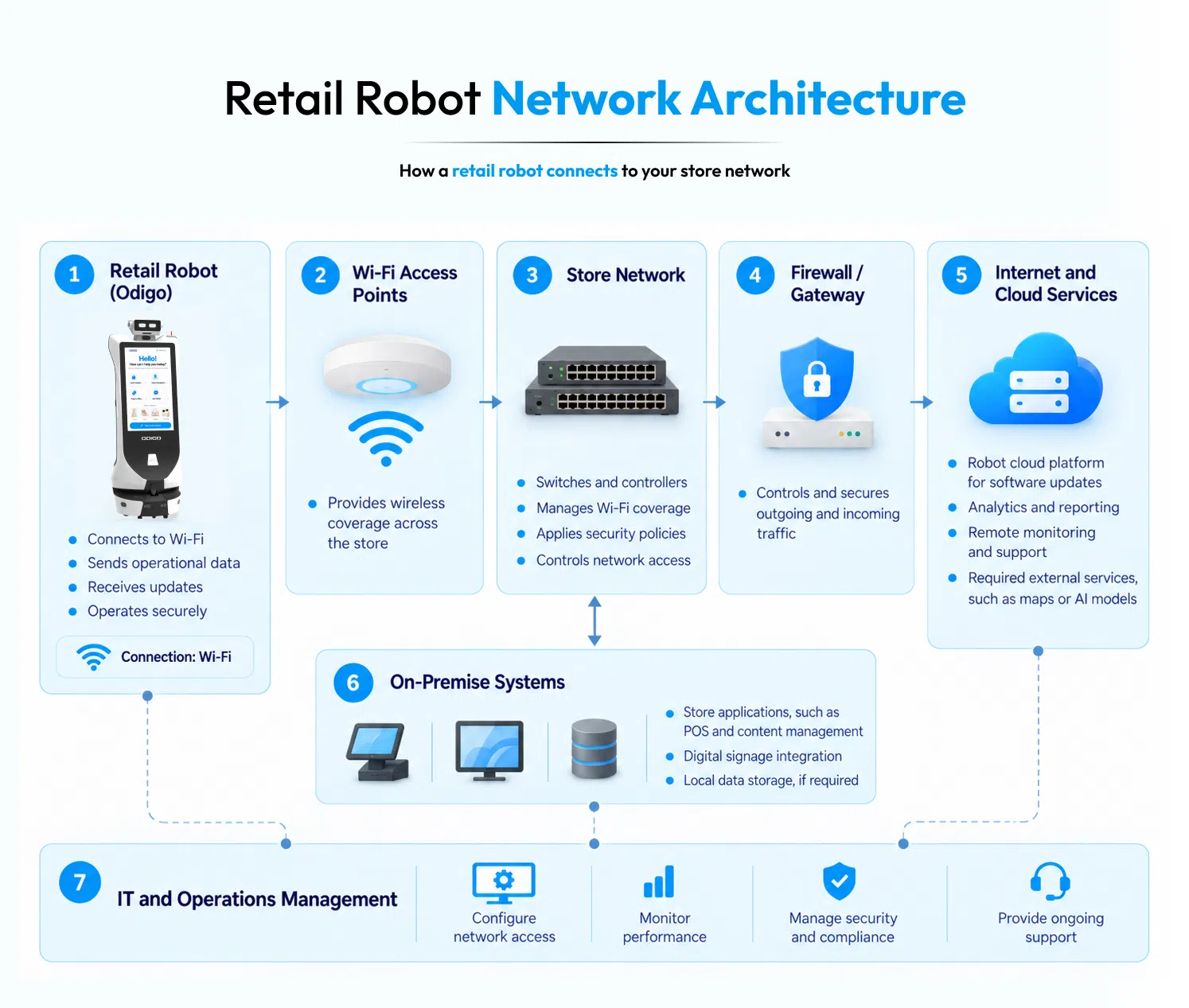
Follow the Robot’s Connection Path
A simple network diagram helps store IT understand where access may be required.
Illustrative connection path:
Retail robot → Wi-Fi access point → Store network controls → Required network services
The actual path may differ. Some functions may operate locally, while others may depend on approved external services or cellular connectivity.
Ask the robotics provider to map the connection path for the specific deployment. Request the required destinations, ports, protocols, authentication method, and any internet dependencies before submitting firewall or network-access requests.
Practical tip: One preventable reason why retail robots fail is poor network planning. Avoid asking IT to approve unrestricted network access simply to get a robot connected. Request only the documented access required for approved functions, subject to the retailer’s security policies.
Interactive Check: Is Your Store Network Ready for a Robot?
Before moving to technical testing, assess how much your team already knows. Select every item you can confirm with documentation or test evidence.
- The complete operating route and charging area have been identified.
- The manufacturer has documented the robot’s network requirements.
- The property’s IT or security team has confirmed the permitted connection method.
- Required services and firewall rules have been documented and reviewed.
- A technical owner and support escalation process have been assigned.
How to interpret your results
Use the five checks to assess network readiness before go-live. Confirmed results support the next testing stage, while unresolved items require clear ownership and evidence. Blocked connections need investigation and retesting before deployment approval.
All five confirmed
Proceed to controlled connectivity testing and the required deployment approvals.
One or more items unconfirmed
Record each unknown as an action item. Assign an owner and obtain the missing evidence before treating network readiness as approved.
A required connection is blocked
Ask the robotics provider and IT team to investigate the specific dependency. Document the resolution and retest before go-live.
Turn Network Requirements Into Deployment Evidence
A useful robot network setup process needs more than an email confirming Wi-Fi access. Create a record for every requirement using four fields: requirement, responsible owner, verification method, and evidence of completion.
For example, if property IT has not approved device registration, assign the request to the relevant IT contact and record the approval before scheduling the deployment test.
The same method strengthens robotic network configuration across multiple stores. Teams can reuse approved requirements while documenting local network differences, unresolved issues, and site-specific approvals.
Once the robot is deployed, retailers can use a before vs after advertising robot in retail comparison to evaluate performance against a documented baseline.
The goal is clear: replace assumptions about the store network with verified requirements and documented deployment decisions.
How to Test a Retail Robot Network Before Go-Live
A network specification tells you what a retail robot needs. A deployment test establishes whether the store can provide those conditions in practice.
Use the following process to move from technical documentation to a verified deployment decision. Each stage produces an outcome your store IT team and robotics provider can review together.
Stage 1: Prepare Before the Site Visit
Request the robot manufacturer’s network documentation before scheduling installation. Ask the retailer’s IT team to review the requirements and identify any access approvals or configuration changes needed.
Prepare three items:
- The manufacturer’s documented connectivity requirements
- The planned operating route and testing locations
- A list of required approvals, responsible teams, and unresolved questions
Pass condition: The teams understand what needs testing, who will perform each check, and which requirements still need clarification.
Stage 2: Test the Actual Operating Route
Walk the planned route with the store IT team and robotics provider. Mark locations where connectivity needs verification, including areas where the robot changes coverage zones or operates near potential obstacles.
Run the tests using the manufacturer’s recommended procedure. Record the location, test conditions, observed interruptions, and any relevant diagnostic information.
Do not rely solely on a network coverage map or a phone’s Wi-Fi indicator. Neither establishes that the robot’s specific connectivity requirements have been met.
For advertising robots, route validation also helps retailers identify where mobile campaigns can run reliably as part of their broader retail media inventory.
Pass condition: The planned route has been tested against the agreed criteria, and any gaps have a documented next step.
Stage 3: Verify the Functions That Depend on Connectivity
A successful Wi-Fi connection is only one test result. The next step is to confirm that the network permits the services required for the intended deployment.
Work from the manufacturer’s documented dependencies. Test the relevant functions under the approved network configuration, including any required remote services, content updates, or technical support connections.
If a function fails, record the exact symptom and ask the relevant team to investigate. A blocked service, an access-policy issue, and an unstable wireless connection may require different remedies.
Pass condition: Every required function included in the deployment test has passed its agreed acceptance criteria, or has a documented issue awaiting resolution.
Stage 4: Repeat Tests After Configuration Changes
A network adjustment is not proof that a problem has been resolved. Retest the affected route, service, or function after IT makes an approved change.
Record the original issue, the corrective action, the retest result, and the person responsible for confirming the outcome. Where practical, repeat relevant tests under representative operating conditions.
Reliable connectivity also supports consistent retail advertising by helping teams verify that network-dependent robot functions work as intended.
Pass condition: The original failure has been retested, the result is documented, and any remaining limitations are understood by the teams responsible for deployment.

Stage 5: Record the Go-Live Decision
Bring the test results, vendor specifications, security approvals, and unresolved issues into one deployment record.
Use the following example as a starting point:
| Item | Test result | Next action |
| Route connectivity | Passed against agreed criteria | Record evidence |
| Required service access | Connection blocked | IT and robotics provider investigate |
| Device registration | Approval pending | Obtain property IT approval |
| Post-change retest | Not completed | Repeat the affected test |
The entries above are illustrative, not results from an actual deployment.
Classify the deployment as ready for final approval, awaiting remediation, or blocked pending validation. A technical test passing does not override a required security or property approval.
Turn the Test Process Into a Repeatable Record
For every deployment, retain the requirement, test method, result, supporting evidence, owner, and approval status. Store the record alongside the relevant network documentation so future teams can understand what was tested and why the deployment was approved.
For a multi-store rollout, reuse the core test plan while recording each location’s network differences and exceptions. A consistent process gives retail IT infrastructure teams a clearer basis for comparing sites without assuming that one successful pilot validates every store.
For retailers deploying a grocery store robot, documented test results help teams assess network readiness before expanding to additional locations.
The result: Robot network configuration becomes a documented deployment process, rather than a last-minute attempt to make a connection work.
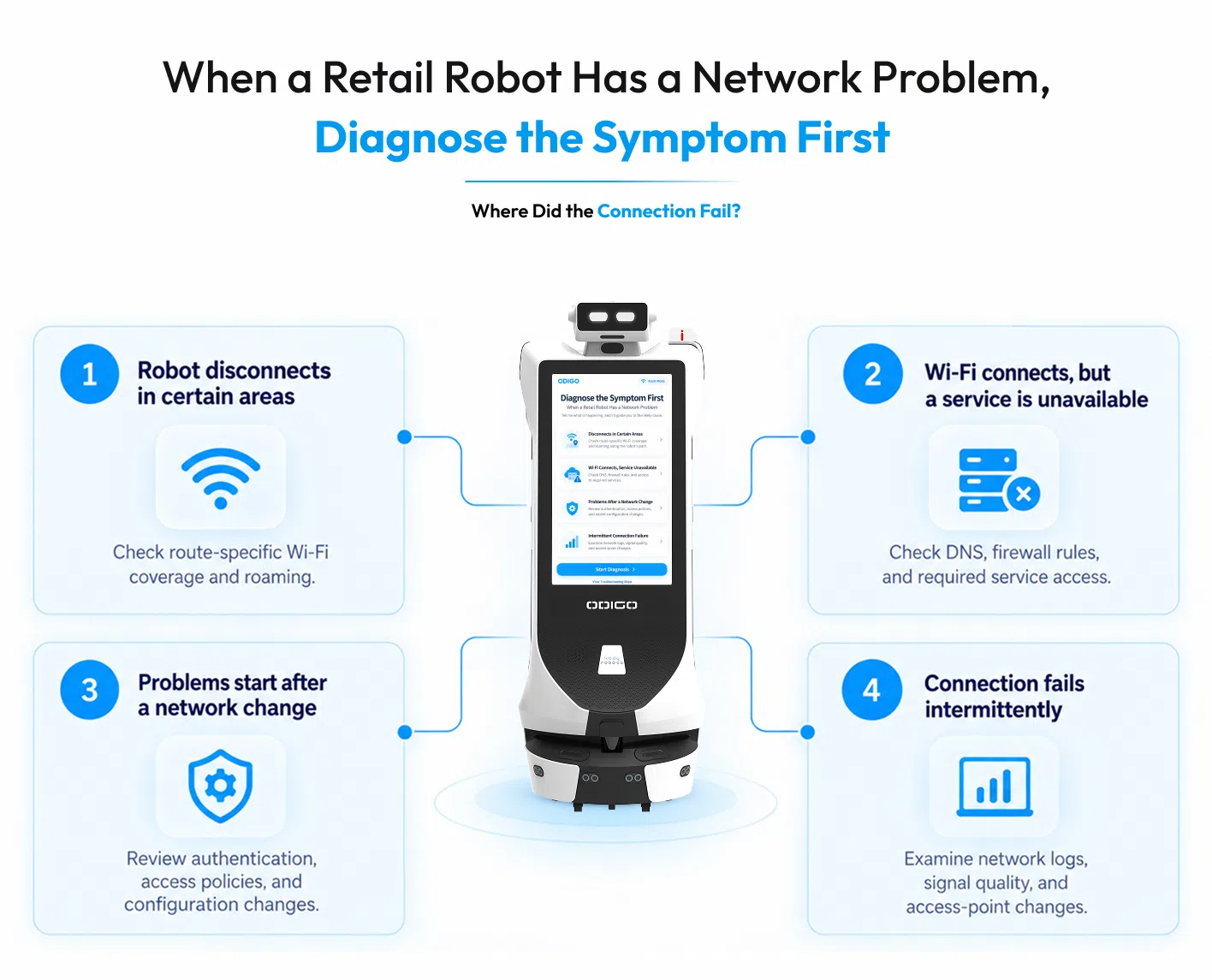
When a Retail Robot Has a Network Problem, Diagnose the Symptom First
A robot disconnecting in one aisle needs a different investigation than a robot that connects to Wi-Fi but cannot reach a required service. Changing network settings without identifying the failure can create additional problems or hide the original cause.
For effective robot network configuration, start with the observable symptom. Understanding what an advertising robot needs from the store network helps teams identify where the failure occurs, determine which connection or service is affected, and collect evidence before making changes. A structured approach helps retail IT teams and robotics providers resolve problems without unnecessary disruption to store operations.
Four Common Network Problems and Where to Start
Use the symptom as the starting point for troubleshooting rather than changing network settings immediately. For a grocery store robot, identifying when and where a failure occurs helps IT teams and the robotics provider isolate the likely cause, verify the relevant dependencies, and document the corrective action.
| What you observe | What to investigate first | Who should lead |
| The robot loses connectivity in the same aisle or location. | Compare connection behavior across the affected route and nearby locations. Check coverage, roaming behavior, and any location-specific network restrictions. | Network team, with support from the robotics provider |
| The robot connects to Wi-Fi, but a required function remains unavailable. | Verify whether the required service is reachable. Review documented DNS, firewall, authentication, and access-policy dependencies. | Store IT and the robotics provider |
| Connectivity changes after a network policy or configuration update. | Compare the current settings with the last known working configuration. Review recent changes to access rules, credentials, or device registration. | Network or security team |
| Connectivity problems appear intermittently during busy operating periods. | Record when and where failures occur. Compare conditions during affected and unaffected periods, then investigate the relevant connection or service. | Network team and robotics provider |
For a retail store robot, use the troubleshooting steps as a starting point, not a definitive diagnosis. Consult the manufacturer’s documentation and available diagnostic evidence to identify the likely cause before making network changes.
A Four-Step Troubleshooting Method
A structured troubleshooting process helps teams isolate network issues without introducing unnecessary configuration changes. For a grocery store robot, each step should build on documented evidence, involve the right technical owner, and confirm whether the corrective action resolves the original problem.
Step 1: Pinpoint the failure
Record the time, location, affected function, and any error message. Note whether the robot lost its network connection, remained connected but lost access to a service, or experienced a different operational problem.
Step 2: Identify the affected layer
Determine whether the problem relates to wireless connectivity, device authentication, network access controls, or a required application or external service. Ask the robotics provider which diagnostics can distinguish those conditions.
Step 3: Compare against a known working condition
Check whether the same function worked previously, whether the problem occurs at a specific location, and whether a recent network change coincides with the failure. Review available logs and configuration records before adjusting settings.
Step 4: Make one approved change and retest
Have the responsible team address the suspected cause, then repeat the relevant test under comparable conditions. Record the change and the outcome. If the problem remains, preserve the evidence for further investigation rather than repeatedly changing unrelated settings.
Interactive Scenario: Which Team Should Investigate?
Consider the following situation.
A retail robot connects to the store network, but a required remote service becomes unavailable after a firewall policy change.
What should happen next?
A. Open unrestricted internet access for the robot.
B. Ask the network team and robotics provider to verify the required connection against the manufacturer’s specifications and review the recent policy change.
C. Reset every network setting and repeat the installation.
Recommended response: B. The timing suggests a possible relationship between the policy change and the failure, but the cause still needs verification. The teams should inspect the documented dependency, check the relevant access rules, and test the connection after any approved correction. Unrestricted access or a full reset could introduce new risks without resolving the underlying issue.
Keep a Troubleshooting Record That Prevents Repeat Failures
Every resolved incident should produce a short record containing the original symptom, supporting evidence, confirmed cause, corrective action, retest result, and responsible team. If the cause remains uncertain, record it as unresolved rather than treating a temporary recovery as a confirmed fix.
The same records help teams improve robot network setup across multiple stores. When a similar problem appears at another location, technical teams can compare the symptoms and previous findings without assuming the network conditions are identical.
For retailers managing several robots or locations, consistent incident records also give retail IT infrastructure teams a clearer picture of recurring issues, configuration changes, and outstanding support needs.
The guiding principle: Diagnose the failure before changing the network. A documented cause and verified retest provide a stronger basis for reliable operation than repeated trial and error.
How to Scale a Retail Robot Network Across Multiple Stores
A successful robot deployment at one store does not automatically validate the network at every other location. Branches may use different Wi-Fi configurations, authentication policies, security controls, and IT approval processes. Repeating the entire setup independently can create inconsistent requirements and avoidable delays.
A scalable retail robot network needs one standard deployment framework with site-specific validation. The framework keeps core requirements consistent while allowing each location to document its own network conditions, exceptions, and approvals.
Build a Repeatable Network Deployment Framework
Use four layers to manage multi-store robot network configuration.
1. Establish a common technical baseline
Create a master record of the manufacturer’s confirmed network requirements, supported connection methods, required services, security documentation, and acceptance criteria. Keep the approved specifications under version control so teams can identify changes when the manufacturer updates its documentation.
2. Record each store’s differences
Maintain a separate site record for every location. Capture the permitted network access method, device registration requirements, relevant IT contacts, local restrictions, and any exceptions to the common baseline.
3. Assign ownership for unresolved requirements
Define who handles each open item. Store IT may own access approvals, the robotics provider may clarify product dependencies, and the deployment lead may coordinate site readiness. The responsible party should be explicit, rather than leaving an issue with a general project team.
4. Track changes after approval
A store network can change after a robot goes live. Updated firewall rules, authentication policies, or network equipment may affect previously verified connectivity. Record relevant changes and determine whether the approved deployment tests need to be repeated.
Use a Multi-Store Deployment Matrix
A shared matrix helps operations and IT teams compare locations without assuming every store has identical infrastructure.
| Requirement | Store A | Store B | Store C |
| Manufacturer specifications reviewed | Complete | Complete | Pending |
| Approved network access | Complete | Pending | Complete |
| Site-specific connectivity validation | Complete | Needs retest | Not started |
| Required security approvals | Complete | Pending | Complete |
| Go-live decision | Ready for final approval | Blocked pending action | Awaiting validation |
Illustrative example only. The entries do not represent actual deployment results.*
The matrix separates common requirements from local blockers. A central team can see which stores are ready, which need action, and which lack sufficient evidence for a deployment decision.
Interactive Decision Point: Can One Store’s Setup Be Reused?
Imagine Store A has completed its network approval, and the retailer plans to deploy the same robot at Store B.
Should the team copy Store A’s configuration and proceed directly to installation?
Recommended approach: Reuse the approved documentation as a reference, but validate Store B’s network conditions, device onboarding rules, required service access, and security approvals separately. The same robot may have consistent technical requirements, while the retailer’s infrastructure and policies differ between locations.
If Store B uses a different access method or firewall policy, document the difference and confirm compatibility with the manufacturer before deployment. Repeating unnecessary work is inefficient, but assuming equivalence without evidence can create avoidable delays.
Measure Rollout Readiness, Not Just Deployment Count
A store count alone cannot show whether a multi-location rollout is progressing smoothly. Track operational indicators that help teams identify the source of delays.
- Approval lead time: How long does each location take to complete required IT and security approvals?
- Open requirements per store: Which technical documents, tests, or decisions remain outstanding?
- First-pass validation: How often do locations meet their agreed acceptance criteria without corrective action?
- Repeat network issues: Are similar problems appearing across multiple locations, indicating a shared dependency or implementation gap?
Define each measure consistently before comparing results. For example, count approval lead time from a clearly defined starting point, such as submission of a complete network review package, rather than mixing it with time spent gathering missing documentation.
Review recurring failures with the robotics provider and relevant IT teams. A problem affecting several stores may require a change to the shared deployment process, while an isolated issue may need a site-specific remedy.
The practical advantage: A standardized retail robot network setup gives every location a clear starting point, while documented exceptions keep site-level differences visible. Retail IT infrastructure teams can coordinate approvals, compare rollout progress, and make deployment decisions using consistent evidence rather than assumptions.
Questions to Ask Before Choosing a Retail Robot
A retail robot may meet your operational needs but still require network changes, additional security reviews, or integration work before deployment.
Understanding why supermarkets deploy robots should go hand in hand with reviewing network compatibility during vendor evaluation, not after the purchase agreement is signed.
Strong answers should include technical documentation, clearly defined dependencies, and named responsibilities. General assurances such as “works with Wi-Fi” do not give retail IT teams enough information to approve a connection.
Seven Questions That Reveal Network Readiness
Use the following questions during vendor evaluation to confirm whether the robot can meet your store’s network, security, and operational requirements. Clear answers, supporting documentation, and assigned responsibilities help retail IT teams identify deployment gaps before installation and avoid delays during go-live.
| Ask the robotics provider | What a strong answer should include | Warning sign |
| 1. Which Wi-Fi standards, frequency bands, and authentication methods does the robot support? | A current, documented compatibility specification. | The provider confirms only that the robot supports Wi-Fi. |
| 2. What network services does the robot need to operate? | A list of required destinations, ports, protocols, DNS dependencies, and external services, where applicable. | The provider cannot explain which connections are necessary. |
| 3. Which functions operate locally, and which depend on internet or cloud access? | A function-by-function explanation of local capabilities, connected services, and any relevant limitations. | The provider treats every function as dependent on connectivity without explaining the architecture, or cannot describe behavior during service interruptions. |
| 4. Can the robot connect under the retailer’s existing security policies? | Supported onboarding options, device-registration requirements, and documentation for the IT security review. | Deployment depends on unrestricted network access without a documented justification. |
| 5. What happens when connectivity is interrupted? | An explanation of expected behavior, affected functions, recovery procedures, and any operational limitations. | The provider cannot explain how connectivity loss affects the intended use case. |
| 6. How are software updates and remote support handled? | Documented update procedures, authorization controls, remote-access requirements, and support responsibilities. | Access permissions and update responsibilities remain unclear. |
| 7. Who handles network troubleshooting during deployment and live operation? | Clear ownership for robot diagnostics, network changes, escalation, and retesting after corrective action. | The retailer and provider each assume the other team will investigate failures. |
The exact answers depend on the robot’s architecture and the manufacturer’s supported configuration. Request written specifications rather than relying solely on sales demonstrations or verbal assurances.
Put the Answers Through a Practical Decision Test
Use three questions to decide whether the provider has supplied enough information for your IT team to proceed.
Can IT review the connection before the robot arrives?
The provider should supply the relevant network documentation early enough for the retailer to review access requirements, device onboarding, and security controls.
Can the provider explain the consequences of a network change?
Ask how the team identifies affected functions, diagnoses failures, and verifies recovery after an approved configuration change.
Can the requirements be reused across multiple stores?
Look for a repeatable technical specification and a documented process for recording site-specific differences. Standard documentation can simplify rollout planning, while each location still needs its own validation and approvals.
If any answer remains unclear, record the missing information as a purchasing or deployment action. Assign an owner and agree on a deadline before the unresolved item becomes a blocker.
Make Network Compatibility Part of Vendor Evaluation
A useful robot network configuration review should happen alongside assessments of functionality, integration, support, and operational suitability. The same principle applies to robotic network configuration across a multi-store rollout: technical requirements need documented ownership, not assumptions.
Before signing off, ask the provider to supply a network-readiness pack containing the confirmed robot network requirements, supported robot Wi-Fi configuration, required service connections, security documentation, connectivity-loss behavior, and support escalation process.
Share the documentation with the teams responsible for store network approval and retail IT infrastructure. Their review can surface compatibility gaps early, clarify deployment responsibilities, and help establish realistic installation requirements.
The purchasing principle is simple: Evaluate whether the provider can demonstrate network compatibility and support readiness, not merely whether the robot can connect during a demonstration.
How Kody Robots Prepares Odigo for Retail Network Deployment
Deploying Odigo in a retail environment requires coordination between the robotics provider, venue management, and the property’s IT and security teams. A network configuration that works at one mall may not meet another property’s access policies or approval requirements.
Kody Robots’ deployment planning for Odigo AI Robot Assistant accounts for the venue’s network access rules, technical approvals, operating environment, and support arrangements. The goal is to identify site-specific requirements before installation, giving every team a clear understanding of its responsibilities.
1. Align Odigo’s Connectivity With the Venue’s IT Policies
Before installation, Kody Robots and the venue’s IT team need to establish which network access method the property permits. Depending on the deployment, the options to evaluate may include guest Wi-Fi, a dedicated network, or cellular connectivity.
The appropriate choice depends on the venue’s policies and Odigo’s confirmed technical specifications.
The teams should establish three things before proceeding:
Permitted connection method
Confirm which network access options the property allows.
Technical compatibility
Verify Odigo’s supported connection method against the property’s requirements.
Approval requirements
Identify any device registration, security reviews, or formal permissions required before access is granted.
Kody Robots’ deployment checklist calls for network access and property IT/security approval to be addressed in advance. Early coordination helps identify restrictions before they delay installation.
2. Establish Clear Responsibilities Before Installation
Network preparation works best when each team knows what it needs to deliver. A shared responsibility record can help prevent approval requests, technical questions, and support arrangements from being overlooked.
| Responsibility | Kody Robots | Venue IT or management |
| Odigo’s technical requirements | Provide or confirm the applicable product documentation | Review the requirements against property policies |
| Network access | Clarify the connection requirements for the planned deployment | Confirm permitted access methods and applicable controls |
| Device registration | Supply the information needed for the review | Complete or coordinate the property’s approval process |
| Connectivity testing | Support Odigo-specific technical checks | Support testing of the approved store network |
| Issue escalation | Identify the appropriate robotics support contact | Identify the appropriate network or security contact |
The exact division of work should be agreed upon for each deployment. A named contact on each side helps the teams resolve questions without passing responsibility between departments.
3. Plan Support Around Actual Operating Hours
Technical preparation should account for the period after installation, including live operating hours and situations where the property is closed.
Before Odigo goes live, agree on whom to contact if a connection problem occurs, which team investigates the issue, and how support will be arranged outside normal business hours.
For a retail robot network, the support plan should also identify what happens after an approved network change. The relevant teams can determine whether the change affects Odigo and whether additional connectivity tests are necessary.
The operational benefit: Store teams have a defined escalation path instead of searching for the correct contact during a live deployment issue.
4. Include Sensor and Privacy Reviews Where Applicable
Depending on the configuration and intended use, a venue may also need to review camera or sensor-related data handling before deployment.
Kody Robots’ US deployment checklist flags camera and sensor privacy checks where applicable. For US venues, the relevant legal and privacy teams should evaluate the actual functions, data collected, and requirements that apply to the deployment location.
The review should establish which approvals are necessary before operation, rather than assuming the same process applies at every property.
Interactive Deployment Check: Is Your Venue Ready for Odigo?
Before scheduling installation, review the following questions with your team.
- Has the venue confirmed its permitted network access method?
- Have Odigo’s applicable connectivity requirements been confirmed with Kody Robots?
- Has property IT completed any required device registration or security review?
- Do both teams have named technical contacts for testing and troubleshooting?
- Have applicable camera, sensor, or privacy reviews been addressed?
If every answer is yes: Proceed with the agreed connectivity tests and remaining deployment approvals.
If any answer is no: Record the missing requirement, assign an owner, and agree on the next action before finalizing the installation plan.
A Consistent Process for Every Retail Location
A documented deployment process helps Kody Robots and retail operators prepare for differences between properties without assuming that every store network is identical. The same core questions can guide each rollout, while location-specific approvals, connectivity requirements, and support arrangements remain documented separately.
For retailers evaluating robot network configuration across multiple locations, the priority is to establish technical compatibility, clarify responsibility, and verify site readiness before go-live. Understanding the advertising robot business model can also help retailers align deployment planning with their commercial objectives. Kody Robots can use that process to coordinate Odigo’s deployment requirements with the relevant venue teams.
Planning an Odigo deployment? Bring your IT team into the discussion early so network requirements and property approvals can be reviewed alongside the deployment plan.
Plan Your Retail Robot Network Configuration with Kody Robots
Reliable robot network configuration starts before installation. Document the manufacturer’s requirements, assign an IT owner, and agree on acceptance tests before confirming the deployment date. For multi-store rollouts, maintain consistent approval criteria while documenting each location’s network differences and unresolved dependencies.
Kody Robots develops and deploys autonomous, AI-powered robots for commercial environments. As a Physical AI company, Kody Robots builds its robotics hardware, navigation, machine vision, and software platform in-house. For retailers planning an Odigo deployment, early coordination with Kody Robots and the venue’s IT team helps clarify technical requirements, address access restrictions, and prepare for site-specific validation.
Planning to deploy Odigo? Connect with Kody Robots a leading Robotics Company in India to discuss your venue’s network requirements and coordinate technical preparation before installation.

Robot Network Configuration – General FAQs
Find answers to common questions about robot network requirements, Wi-Fi connectivity, security approvals, troubleshooting, and deployment readiness. Learn how to prepare your store network and validate connectivity before deploying robots across one or multiple retail locations.
1. What are the main robot network requirements?
The main robot network requirements include reliable route coverage, supported Wi-Fi or cellular connectivity, approved authentication, access to required services, and appropriate security controls. Robot network configuration should follow the manufacturer’s specifications, including required destinations, protocols, and connectivity dependencies.
2. Does a retail robot need a dedicated Wi-Fi network?
Not always. A retail robot may use guest Wi-Fi, a dedicated network, or cellular connectivity, depending on product specifications and store policies. Before approving a robot Wi-Fi connection, the IT team should verify compatibility, device registration, access restrictions, and security requirements for the retail robot network.
3. How do you configure a store network for a retail robot?
Effective robot network setup starts with the manufacturer’s connectivity documentation. The IT team should review authentication, firewall rules, required services, and internet dependencies before testing the robot under an approved configuration. Proper robotic network configuration also requires documenting test results and resolving outstanding issues before deployment approval.
4. How can retailers troubleshoot a robot that connects to Wi-Fi but cannot access a required service?
First, identify the affected function and confirm whether the robot remains connected to the store network. Review the manufacturer’s documented requirements, then investigate DNS resolution, firewall rules, authentication, and service availability. The network team and robotics provider should verify the cause, apply approved corrections, and retest the affected function.
5. How can retailers standardize robot network configuration across multiple stores?
Retailers can standardize deployments with a shared checklist covering technical specifications, network approvals, test criteria, responsible owners, and verification records. Each location still requires site-specific validation. A consistent process helps retail IT infrastructure teams manage local differences, document exceptions, and apply the same approval framework across multiple deployments.