

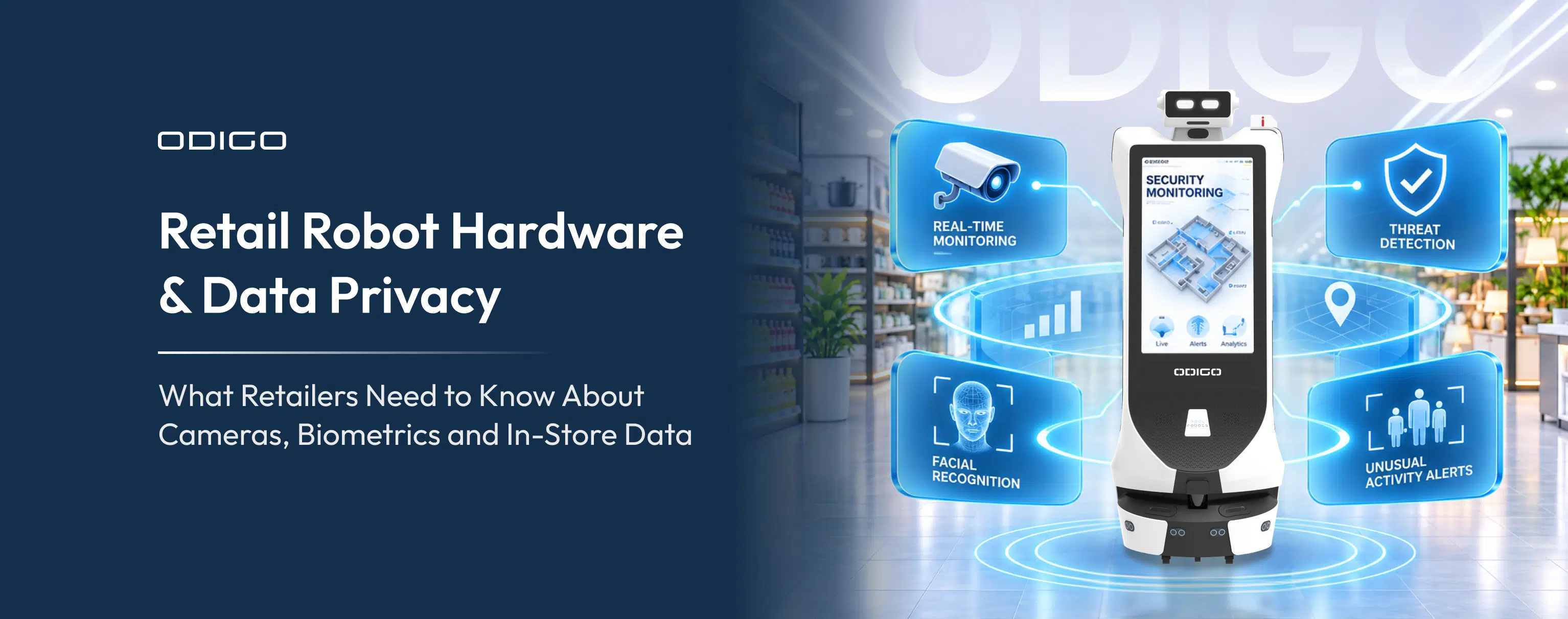

Quick Summary: Retail robot hardware can capture visual, spatial, and audio data for navigation, shopper interaction, and analytics. A camera alone does not determine whether a robot handles biometric information. The real boundary depends on what the system captures, how the system processes data, where the system stores data, and who can access the information.
Key Takeaways
- Retail robot hardware includes cameras, LiDAR, depth sensors, and microphones, with each sensor serving a different role in store-floor operations.
- Retail robot privacy depends on how retailers use camera data for perception, analytics, recognition, or individual identification.
- Robot data privacy requires retailers to trace data from capture and processing through storage, transmission, access, and deletion.
- Odigo Robot Hardware combines visual and spatial sensing for autonomous navigation, making sensor and data handling part of deployment review.
- In-store data privacy also covers local image storage, visual SLAM, audio capture, network access, and location-specific privacy requirements.
Why Retail Robot Cameras Require a Closer Look at Data Privacy
A camera on a retail robot does not, by itself, tell you what kind of data the robot handles.
A camera may help a robot detect obstacles, understand its surroundings, support visual SLAM, or interact with shoppers. A different software layer may analyze visual information for analytics or recognition. Biometric processing enters the discussion when a system uses biological characteristics, such as facial features, to identify or authenticate an individual.
For retailers evaluating retail robot hardware, the important question therefore goes beyond whether a robot has cameras. The review needs to follow the data: what the sensors capture, what the software processes, where the system stores information, whether the system transmits anything, who can access it, and how long the system retains it.
The distinction matters as AI-enabled systems gain a larger role in retail operations. Deloitte’s 2026 Retail Industry Global Outlook found that nearly 68% of surveyed retail executives expect to deploy agentic AI for key operational and enterprise activities within 12 to 24 months. (Source: Deloitte)
As more intelligent systems enter store environments, retailers need to evaluate retail robot privacy at the data-handling level, not simply at the hardware level.
What Does an Autonomous Retail Robot Actually Capture?
An autonomous robot uses several sensors to understand its surroundings, move safely, and interact with people. Each sensor captures a different type of information, so retailers need to understand the role of every component before evaluating privacy implications.
Different sensors capture different types of information, with each component supporting a specific robot function.
For anyone reviewing a retail intelligence robot, the key distinction is simple: a sensor’s presence does not tell you how the captured information is ultimately used.
What different sensors capture
The table below explains what each sensor captures and why the robot needs it.
| Hardware | What it captures | Why the robot needs it |
| Full HD camera | Images of people, objects, shelves, signs, and the surrounding environment | Visual perception, navigation, and interaction |
| 3D depth camera | Distance and depth information about objects and surroundings | Spatial perception and obstacle detection |
| LiDAR | Distance measurements and environmental geometry | Mapping, localization, and navigation |
| Ultrasonic sensor | Short-range proximity information | Detecting nearby obstacles |
| Microphone array | Voice and audio within its listening range | Voice commands and AI assistant functions |
| IMU | Motion, acceleration, and orientation | Movement tracking and navigation |
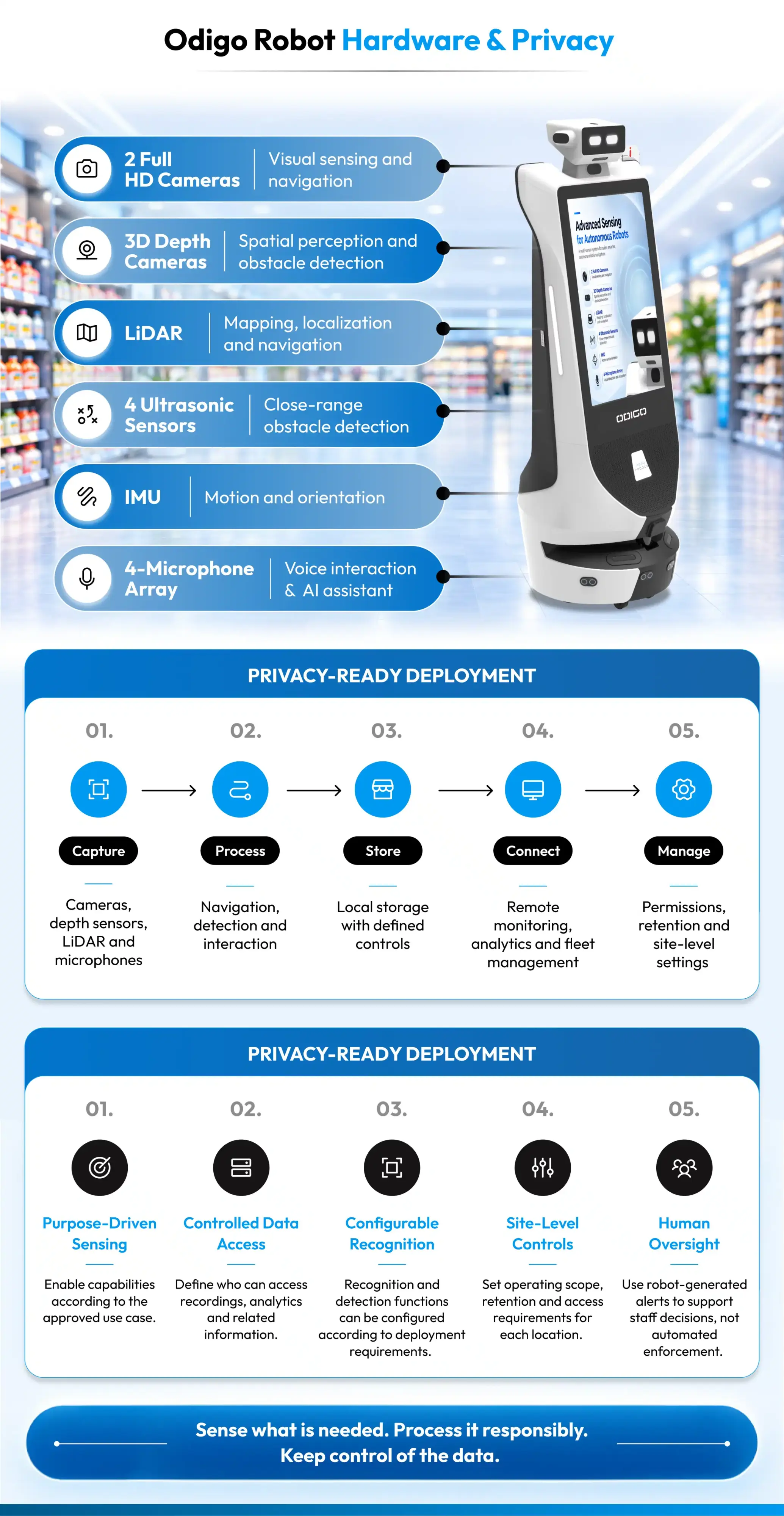
Odigo uses two Full HD cameras, three 3D depth cameras, LiDAR, four ultrasonic sensors, a four-microphone array, and an IMU. The navigation system combines laser and visual SLAM with real-time obstacle avoidance.
Each component serves a different operational purpose. LiDAR, for example, measures distance and supports mapping. Depth cameras provide additional spatial information. Ultrasonic sensors help detect nearby objects. Cameras provide visual information that can support perception and navigation.
The distinction matters for retail robot sensor hardware because different sensors create different categories of data. A camera can produce visual images. A depth camera can produce spatial information. A microphone can capture voice input. Treating all sensor output as the same type of data makes a privacy review less precise.
What should retailers ask about the hardware?
A useful hardware review should connect every sensor to a specific function.
Ask the vendor:
- What does the sensor capture?
- Why does the robot need the information?
- Is the information required for navigation, interaction, analytics, or another function?
- Does the system need the raw information, or only a processed result?
- Is the captured information stored after the robot has completed the task?
The final question matters particularly for retail robot camera hardware. A camera may support visual perception without requiring the system to retain every image captured during operation.
The same review should cover microphones. A robot with voice interaction introduces audio into the data discussion, so retailers should understand whether the system processes audio locally, retains it, transmits it, or uses it only to respond to a voice command.
Odigo Robot Hardware: What the sensor mix means
Odigo robot hardware combines visual, spatial, proximity, and audio sensing because the robot performs several functions on a retail floor.
The cameras and depth cameras support visual and spatial perception. LiDAR supports mapping and localization. Ultrasonic sensors provide close-range obstacle detection. The microphone array supports voice interaction. Onboard computing and storage support the robot’s software functions, while network connectivity supports robot network configuration for remote monitoring and platform-based management.
For retailers, the practical takeaway is not simply that Odigo has multiple sensors. The more useful question is which sensor supports each function and what information remains after the function ends.
That distinction provides the right foundation for the next issue: a camera can capture a person’s face without necessarily identifying the person. Understanding where observation ends and biometric identification begins requires looking at the software and data processing layer, not the camera specification alone.
A Camera Does Not Automatically Mean Biometrics
A camera can observe a shopper without identifying the shopper. The privacy implications depend on the processing that follows image capture.
For retailers evaluating retail robot camera hardware, separating sensing from identification provides a more useful way to assess risk. A camera may support navigation or obstacle detection without creating a biometric record. A computer vision system may detect a person, estimate movement, or count visitors without determining who the person is.
A practical way to assess the boundary is to follow four stages:
Capture → Detection → Analysis → Identification
Each stage represents a different level of information processing.
| Processing stage | What the system may do | Retail privacy question |
| Capture | Capture images of people, products, or the surrounding environment | What visual information does the camera collect? |
| Detection | Detect a person, obstacle, object, or movement | Is the output limited to presence or location? |
| Analysis | Derive attributes such as movement patterns, engagement, or other visual characteristics | What information is extracted, and why? |
| Identification | Match a face or other biometric characteristic to a known individual | What identity data is involved, and what legal basis applies? |
The distinction matters because retail robot privacy cannot be assessed from hardware specifications alone. A Full HD camera tells you the robot can capture visual information. The software and data pipeline determine whether the system merely perceives the environment or performs analysis that can raise additional privacy obligations.
Where Odigo Robot Fits
Odigo robot hardware includes two Full HD cameras, three 3D depth cameras, LiDAR, ultrasonic sensors, and a four-microphone array. The robot uses visual and laser SLAM for navigation and real-time obstacle avoidance.
A retailer reviewing Odigo should therefore separate the hardware functions rather than treating every sensor as a biometric technology.
For example:
- Cameras support visual perception and navigation-related functions.
- Depth cameras provide spatial information for perception and obstacle handling.
- LiDAR measures distance and supports mapping and localization.
- Ultrasonic sensors provide short-range obstacle detection.
- Microphones support voice interaction.
The privacy review then moves one level deeper: what information does each function produce, where does processing occur, what information does the system retain, and who can access the resulting data? Reviewing in-store robot data collection alongside the hardware specifications can help procurement teams assess those questions more systematically.
A useful rule for procurement teams is simple:
A camera presence tells you what a robot can see. Data processing tells you what the retailer needs to govern.
The distinction gives retailers a clearer starting point for reviewing biometric hardware, camera-based analytics, and broader in-store data privacy requirements without treating every camera-equipped robot as a biometric system.
Robot Data Privacy: What Happens After the Odigo Retail Robot Assistant Captures Data?
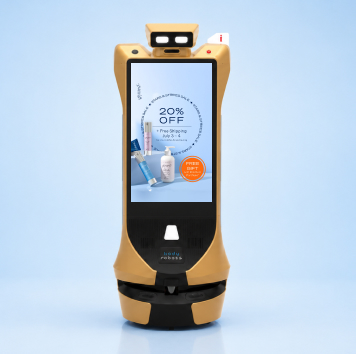
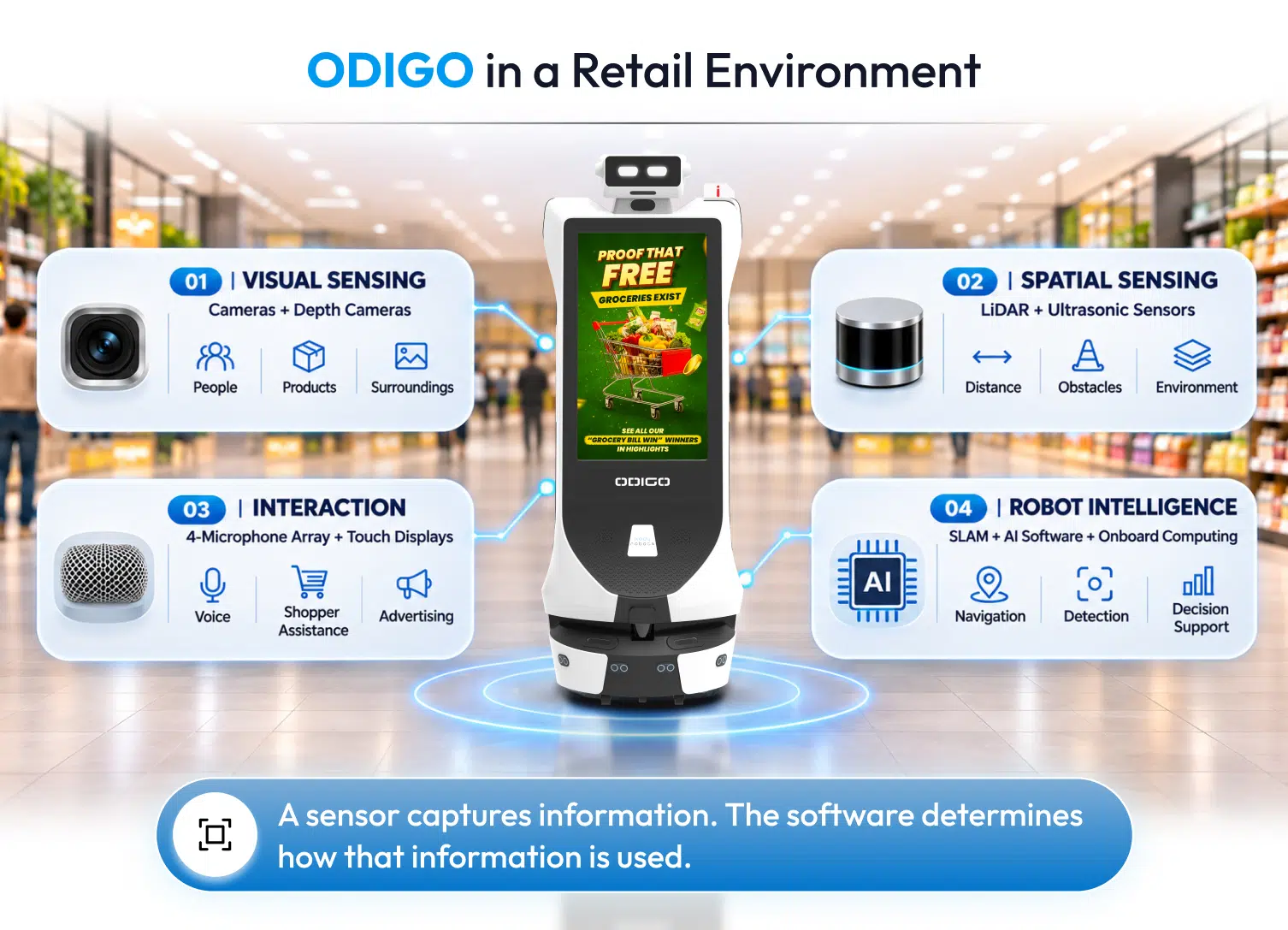
Odigo operates around shoppers, guides visitors, displays advertising, and supports voice and touch interactions. Supporting those functions requires more than a display and a navigation system.
The Odigo robot hardware includes two Full HD cameras, three 3D depth cameras, LiDAR, four ultrasonic sensors, an IMU, and a four-microphone array. Onboard computing and storage support the robot’s software, while Wi-Fi and cellular connectivity support its connected functions. Odigo also uses a central AdTech platform for remote campaigns, real-time analytics, and fleet control, creating opportunities to manage retail media inventory across deployed robots.
For retailers, the important question is how each capability fits into the operating environment.
A useful way to review robot data privacy is to connect each Odigo function with the information required to perform it.
Where Privacy Enters Odigo’s Core Functions
Each Odigo capability uses a different combination of sensors and generates different types of information. The privacy review should consider each function separately rather than treating every sensor as a single data source.
The table below maps Odigo’s core functions to the hardware involved and the key questions retailers should review.
| Odigo function | Hardware involved | Information involved | Retailer review point |
| Autonomous navigation | Cameras, depth cameras, LiDAR, ultrasonic sensors, IMU | Visual and spatial information about the environment | What information is required for navigation, and what remains after navigation? |
| Visitor assistance | Cameras, displays, microphones, speakers | Visual and voice interaction information | What information is used during an interaction? |
| Voice assistant | 4-mic array, speakers, onboard computing | Voice input and system responses | How is voice input handled and retained? |
| Advertising analytics | Cameras, onboard computing, connected platform | Engagement and campaign-related information | What analytics are generated, and where are they available? |
| Remote management | Wireless/cellular connectivity, onboard computing | Device, operational, analytics, and management information | Which information reaches connected systems? |
| Fleet management | Connectivity and management platform | Robot status and operational information | Who can access fleet-level information? |
Odigo’s technical architecture therefore gives retailers several separate areas to review. A privacy assessment should not treat every sensor as though it performs the same function.
Odigo’s Cameras Support More Than One Capability
The two Full HD cameras and three depth cameras form part of Odigo’s visual sensing system. The robot also uses laser and visual SLAM for navigation, with depth cameras fused with LiDAR and ultrasonic sensing for obstacle detection.
The distinction between visual sensing and biometric identification remains important.
A Full HD camera can capture a person’s face within its field of view. The presence of a face in an image does not automatically mean the system identifies the person. Identification requires a separate processing capability and a defined purpose for matching or recognizing an individual.
For a retailer evaluating Odigo, the review should therefore focus on the actual function being deployed.
- If visual sensing supports navigation, the relevant question concerns the information required for safe movement.
- If visual information supports engagement analytics, the retailer needs to understand what analytics are generated.
- If a deployment introduces biometric identification, the privacy and legal review moves into a different category.
- The hardware specification alone cannot answer the final question. The deployed software configuration and intended use matter.
Odigo Also Has an Audio Privacy Consideration
Cameras are not the only components worth reviewing.
Odigo includes a four-microphone array for voice capture and speakers for voice interaction. The robot supports multilingual voice and touch interaction as well as an AI assistant.
Voice interaction creates a separate data consideration because spoken input can contain information that a shopper did not intend to provide beyond the immediate request.
A retailer should ask:
- Does Odigo process voice input only for the active interaction?
- Is voice information retained?
- Where does voice processing occur?
- Does any voice information reach a connected platform?
- Who can access voice-related logs or outputs?
- How long does relevant information remain available?
The questions should be answered for the actual deployment configuration rather than assumed from the presence of the microphone array.
Local Storage Deserves Specific Attention
Odigo includes onboard storage, including a 128 GB SSD in the technical documentation. The robot’s architecture therefore includes a local storage layer alongside its sensing and computing hardware.
For in-store data privacy, local storage deserves its own review because information does not need to leave a robot to create a governance requirement.
Odigo stores camera images locally, so the retailer should establish clear controls around:
- Which images are stored
- Why storage is required
- Which system or personnel can access stored images
- How long images remain available
- How images are deleted or overwritten
- Whether stored images are required for navigation, analytics, troubleshooting, or another approved function
Local storage can reduce dependence on external transmission for particular information, but access and retention still need defined controls.
Connected Odigo Functions Add Another Review Layer
Odigo is also a connected robot.
The technical documentation identifies Wi-Fi, cellular connectivity, remote monitoring, over-the-air updates, and the Odigo Control System cloud dashboard. The Odigo platform also supports remote advertising campaigns, real-time analytics, and fleet control.
The privacy review therefore needs to distinguish between information handled locally and information made available through connected systems.
A retailer should ask the deployment team or vendor to identify:
- What information stays on Odigo?
- What information is sent to another system?
- What information appears in the management platform?
- Who can access each category?
- What information does the specific business function require?
The answers become particularly important when Odigo connects to a venue’s network. Kody’s US deployment checklist recommends confirming whether the robot will use guest Wi-Fi, a dedicated network, or its own SIM/cellular connection. The checklist also recommends involving the property’s IT/security team before approving network access.
What Retailers Should Request Before Deployment
A retailer does not need another generic list of privacy principles. The most useful procurement step is a function-level data map for the actual Odigo deployment.
Ask the vendor to document:
| Review area | Information the retailer should receive |
| Camera system | Camera purpose, visual processing, and image-storage behavior |
| Depth sensing | Role in navigation and obstacle detection |
| Navigation | How visual SLAM and LiDAR support autonomous movement |
| Voice assistant | Voice-input handling and retention |
| Local storage | Information stored on the robot and access controls |
| Analytics | Data generated for engagement or advertising measurement |
| Connectivity | Information exchanged through Wi-Fi or cellular networks |
| Management platform | Information visible through remote monitoring and fleet management |
| Access | Authorized users and administrative controls |
| Retention | Applicable retention and deletion practices |
The resulting document gives IT, operations, legal, and security teams a shared view of how Odigo Retail Robot Assistant operates inside the venue.
Privacy Review Should Follow the Use Case
A retailer deploying Odigo for wayfinding may have a different privacy profile from a retailer using the robot for shopper engagement analytics.
The hardware can remain largely the same while the data considerations change with the configured use case.
That is why a strong retail robot privacy review should connect three things:
What Odigo can sense → What the deployed software uses → What the retailer actually needs
A retailer does not need to treat every camera image, depth measurement, voice interaction, or navigation signal as biometric information.
The stronger approach is to identify the purpose of each capability, limit information handling to the operational requirement, establish appropriate controls, and document how the deployed system behaves before shoppers interact with the robot.
The next section can build on that foundation with a practical retail robot privacy checklist covering the questions procurement, IT, legal, operations, and venue teams should ask before approving deployment.
Retail Robot Privacy Checklist: What Should Retailers Ask Before Deployment?
A privacy review should happen before a robot reaches the sales floor, not after installation. Retailers can use a structured checklist to identify technical gaps, unclear data practices, and deployment requirements early.
The goal is not to reject camera-equipped robotics. The goal is to establish whether the retail robot hardware, software configuration, and operating environment are appropriate for the intended use case.
16 Questions to Ask Before Approving a Retail Robot
Before approving a retail robot, retailers should understand what the hardware captures, how information is processed, and where the information goes.
The following questions help teams evaluate sensing capabilities, data handling, privacy controls, and deployment requirements before deployment.
1. Retail Robot Sensors and Data Collection
Understand what the robot can sense, why each sensor is needed, and which business functions use the resulting information.
| Retailer question | What a strong answer should clarify |
| What cameras and sensors does the robot use? | Exact sensor types, quantities, and their operational functions. |
| Why does each sensor need to collect information? | A clear business or operational purpose for every sensing capability. |
| Does the retail robot camera hardware support navigation, analytics, interaction, or more than one function? | How the Full HD and depth cameras contribute to navigation, obstacle detection, visual perception, interaction, or configured analytics, and which functions are enabled in the deployment. |
| Does the robot perform biometric identification? | Whether facial recognition or another biometric identification capability is actually enabled. |
| What information does the retail robot sensor hardware generate? | Visual, depth, spatial, audio, motion, or other information. |
| Does the robot use microphones? | Whether voice input is captured, processed, stored, or transmitted. |
| Which analytics are generated from shopper interactions? | Metrics collected, purpose, aggregation, and access. |
2. Retail Robot Data Processing, Storage, and Access
Trace information after collection, including where processing occurs, what gets stored, and who can access the resulting data.
| Retailer question | What a strong answer should clarify |
| Where does processing occur? | Whether information is processed on the robot, on another local system, or through a connected platform. |
| What information is stored locally? | Whether raw images, audio, analytics, logs, or other information remains on the device. |
| How long is stored information retained? | Defined retention periods and deletion or overwrite practices. |
| Who can access stored information? | Authorized users, administrators, support personnel, or third-party systems. |
| What information leaves the robot? | Data exchanged through Wi-Fi, cellular, Bluetooth, or other connections. |
| What information reaches the management platform? | Device information, analytics, campaign data, images, audio, or other outputs. |
3. Retail Robot Network, Security, and Deployment Governance
Review how connectivity, configuration changes, security controls, and vendor documentation affect the privacy review.
| Retailer question | What a strong answer should clarify |
| Can the venue’s IT team review the network configuration? | Wi-Fi, cellular, device registration, security controls, and connectivity requirements. |
| What changes if a new analytics or recognition feature is enabled later? | Whether configuration changes trigger a fresh privacy and security review. |
| What documentation can the vendor provide? | Data-flow diagrams, technical specifications, security information, retention practices, and deployment requirements. |
The checklist separates questions that often get bundled together. Having a camera is one question. Using the camera for navigation is another. Storing camera images is another. Using visual information for shopper analytics or biometric identification introduces additional considerations.
Use a Four-Part Review Before Sign-Off
A practical retail robot privacy review can also be divided among four internal teams.
Legal: Review applicable privacy, biometric, video, consent, notice, and data-handling requirements for the deployment location.
IT and Security: Review network access, connected systems, authentication, remote access, storage, software updates, and security requirements.
Operations: Confirm which robot functions are actually required. Remove unnecessary sensing or analytics requirements rather than approving every available capability.
Customer Experience: Review whether shoppers receive appropriate notice or explanation when cameras, microphones, or analytics are part of the deployment.
The separation helps prevent a common procurement problem: assigning privacy entirely to the legal team while technical and operational decisions continue without a clear data owner.
Score the Deployment Before Approval
Retailers can turn the checklist into a simple 16-point Retail Robot Privacy Readiness Scorecard.
Give one point for every question with a documented and satisfactory answer.
- 0–5 points: Significant gaps
Key technical, operational, or governance questions remain unanswered.
- 6–11 points: Preparation underway
Core information exists, but the team needs additional documentation or controls before deployment.
- 12–16 points: Strong deployment foundation
The retailer has a clear understanding of the robot’s sensing capabilities, data handling, access, connectivity, and operational purpose.
Treat the score as a deployment-readiness framework, not a legal compliance test. A high score does not establish compliance with a particular privacy law.
Ask for Evidence, Not Just a “Yes”
One of the most useful changes a retailer can make during vendor evaluation is to replace verbal assurances with documentation.
Instead of asking:
“Are the cameras secure?”
ask for:
“Show us where camera information is processed, stored, accessed, and deleted.”
Instead of asking:
“Does the robot use biometrics?”
ask:
Which biometric capabilities are enabled in the proposed configuration, and which software performs the processing?
Instead of asking:
“Is the robot connected to the cloud?”
ask:
“Provide a data-flow diagram showing every external connection and the information exchanged through each connection.”
The difference matters. A specification sheet can tell a retailer that a robot has cameras, microphones, storage, and connectivity. A deployment review needs to show how those components work together in the actual environment.
Keep the Review Configuration-Specific
Retail robot privacy can change when the deployment changes.
A robot configured only for autonomous navigation may generate a different data profile than the same platform configured for shopper engagement analytics, voice interaction, or additional recognition capabilities.
Retailers should therefore record the approved configuration at deployment.
For an odigo retail robot assistant, the record can include:
- Approved camera and sensor functions
- Approved analytics capabilities
- Voice interaction requirements
- Local storage requirements
- Network configuration
- Connected management systems
- Authorized users
- Retention requirements
- Customer-facing notices, where applicable
- Any location-specific legal review
The record gives operations and IT teams a reference point if the robot’s software, analytics configuration, or business purpose changes later.
The Practical Standard
A retailer does not need to ask whether a robot has “too many sensors.”
A better standard is:
Can we explain why each sensor is needed, what information it generates, how the deployed software uses that information, who can access it, and how the system controls the information?
If the answer is clear, the retailer has a much stronger foundation for evaluating robot data privacy, in-store data privacy, and biometric-related concerns. The same framework can help when assessing a robotics company in India and the technology behind its camera-equipped robots, without treating every camera-equipped robot as a biometric system.
Robot Data Privacy: What Happens After the Odigo Retail Robot Assistant Captures Data?
Odigo operates around shoppers, guides visitors, displays advertising, and supports voice and touch interactions. However, supporting those functions requires more than a display and a navigation system.
The Odigo robot hardware includes two Full HD cameras, three 3D depth cameras, LiDAR, four ultrasonic sensors, an IMU, and a four-microphone array. Onboard computing and storage support the robot’s software, while Wi-Fi and cellular connectivity support its connected functions. Odigo also uses a central AdTech platform for remote campaigns, real-time analytics, and fleet control, providing the infrastructure behind an advertising robot business model.
For retailers, the important question is how each capability fits into the operating environment.
A useful way to review robot data privacy is to connect each Odigo function with the information required to perform it.
Where Privacy Enters Odigo’s Core Functions
Odigo combines multiple sensing systems, and each component contributes differently to the robot’s operation. Reviewing the hardware individually helps retailers understand what information each component generates and why the robot needs that information.
The table below maps each Odigo robot hardware component to its primary function and the privacy consideration associated with it.
| Odigo function | Hardware involved | Information involved | Retailer review point |
| Autonomous navigation | Cameras, depth cameras, LiDAR, ultrasonic sensors, IMU | Visual and spatial information about the environment | What information is required for navigation, and what remains after navigation? |
| Visitor assistance | Cameras, displays, microphones, speakers | Visual and voice interaction information | What information is used during an interaction? |
| Voice assistant | 4-mic array, speakers, onboard computing | Voice input and system responses | How is voice input handled and retained? |
| Advertising analytics | Cameras, onboard computing, connected platform | Engagement and campaign-related information | What analytics are generated, and where are they available? |
| Remote management | Wireless/cellular connectivity, onboard computing | Device, operational, analytics, and management information | Which information reaches connected systems? |
| Fleet management | Connectivity and management platform | Robot status and operational information | Who can access fleet-level information? |
Odigo’s technical architecture therefore gives retailers several separate areas to review. A privacy assessment should not treat every sensor as though it performs the same function.
Odigo’s Cameras Support More Than One Capability
The two Full HD cameras and three depth cameras form part of Odigo’s visual sensing system. The robot also uses laser and visual SLAM for navigation, with depth cameras fused with LiDAR and ultrasonic sensing for obstacle detection.
The distinction between visual sensing and biometric identification remains important.
A Full HD camera can capture a person’s face within its field of view. The presence of a face in an image does not automatically mean the system identifies the person. Identification requires a separate processing capability and a defined purpose for matching or recognizing an individual.
For a retailer evaluating Odigo, the review should therefore focus on the actual function being deployed.
Navigation use requires an assessment of the information needed for safe movement.
Engagement analytics require retailers to understand which analytics the system generates from visual information.
Biometric identification, if enabled in a deployment, introduces a different category of privacy and legal considerations.
The hardware specification alone cannot answer the final question. The deployed software configuration and intended use matter.
Odigo Also Has an Audio Privacy Consideration
Cameras are not the only components worth reviewing. Alongside visual sensors, Odigo uses a four-microphone array for voice capture and speakers for voice interaction. The AI assistant also supports multilingual voice and touch interaction.
For privacy reviews, spoken input deserves separate consideration because shoppers may share information beyond the immediate request.
For retailers, the practical question is:
- Does Odigo process voice input only for the active interaction?
- Is voice information retained?
- Where does voice processing occur?
- Does any voice information reach a connected platform?
- Who can access voice-related logs or outputs?
- How long does relevant information remain available?
The questions should be answered for the actual deployment configuration rather than assumed from the presence of the microphone array.
Local Storage Deserves Specific Attention
Odigo includes onboard storage, including a 128 GB SSD in the technical documentation. The robot’s architecture therefore includes a local storage layer alongside its sensing and computing hardware.
For in-store data privacy, local storage deserves its own review because information does not need to leave a robot to create a governance requirement.
Odigo stores camera images locally, so the retailer should establish clear controls around:
- Which images are stored
- Why storage is required
- Which system or personnel can access stored images
- How long images remain available
- How images are deleted or overwritten
- Whether stored images are required for navigation, analytics, troubleshooting, or another approved function
Local storage can reduce dependence on external transmission for particular information, but access and retention still need defined controls.
Connected Odigo Functions Add Another Review Layer
Odigo is also a connected robot.
The technical documentation identifies Wi-Fi, cellular connectivity, remote monitoring, over-the-air updates, and the Odigo Control System cloud dashboard. The Odigo platform also supports remote advertising campaigns, real-time analytics, and fleet control.
The privacy review therefore needs to distinguish between information handled locally and information made available through connected systems.
A retailer should ask the deployment team or vendor to identify:
- What information stays on Odigo?
- What information is sent to another system?
- What information appears in the management platform?
- Who can access each category?
- What information is required for the specific business function?
The answers become particularly important when Odigo connects to a venue’s network. Kody Robots’ US deployment checklist recommends confirming whether the robot will use guest Wi-Fi, a dedicated network, or its own SIM/cellular connection. The checklist also recommends involving the property’s IT/security team before approving network access.
What Retailers Should Request Before Deployment
A retailer does not need another generic list of privacy principles. For procurement teams, the more useful approach is to create a function-level data map for the actual Odigo deployment.
Ask the vendor to document:
| Review area | Information the retailer should receive |
| Camera system | Camera purpose, visual processing, and image-storage behavior |
| Depth sensing | Role in navigation and obstacle detection |
| Navigation | How visual SLAM and LiDAR support autonomous movement |
| Voice assistant | Voice-input handling and retention |
| Local storage | Information stored on the robot and access controls |
| Analytics | Data generated for engagement or advertising measurement |
| Connectivity | Information exchanged through Wi-Fi or cellular networks |
| Management platform | Information visible through remote monitoring and fleet management |
| Access | Authorized users and administrative controls |
| Retention | Applicable retention and deletion practices |
The resulting document gives IT, operations, legal, and security teams a shared view of how Odigo retail robot assistant operates inside the venue.
Privacy Review Should Follow the Use Case
A retailer deploying Odigo for wayfinding may have a different privacy profile from a retailer using the robot for shopper engagement analytics. A focused Odigo robot privacy review should therefore consider the specific functions enabled for each deployment.
The hardware can remain largely the same while the data considerations change with the configured use case.
That is why a strong retail robot privacy review should connect three things:
What Odigo can sense → What the deployed software uses → What the retailer actually needs
A retailer does not need to treat every camera image, depth measurement, voice interaction, or navigation signal as biometric information.
The stronger approach is to identify the purpose of each capability, limit information handling to the operational requirement, establish appropriate controls, and document how the deployed system behaves before shoppers interact with the robot.
The next section can build on that foundation with a practical retail robot privacy checklist covering the questions procurement, IT, legal, operations, and venue teams should ask before approving deployment.
Where Should Retailers Draw the Line on Robot Data Privacy?
Retailers do not need to eliminate cameras, microphones, or analytics from an in-store robot to address privacy responsibly. The stronger approach is to define what the robot needs to do, limit data collection to the approved purpose, and control what happens to the information afterward.
A practical boundary can be built around five principles:
1. Collect Only What the Use Case Requires
Navigation may require visual and spatial information. Voice assistance requires audio input. Advertising analytics may require interaction or engagement data.
Each capability should have a defined business purpose. A sensor should not collect additional information simply because the hardware can support it.
2. Separate Operational Data From Identification
A robot can detect a person, understand movement, or recognize an obstacle without identifying the individual.
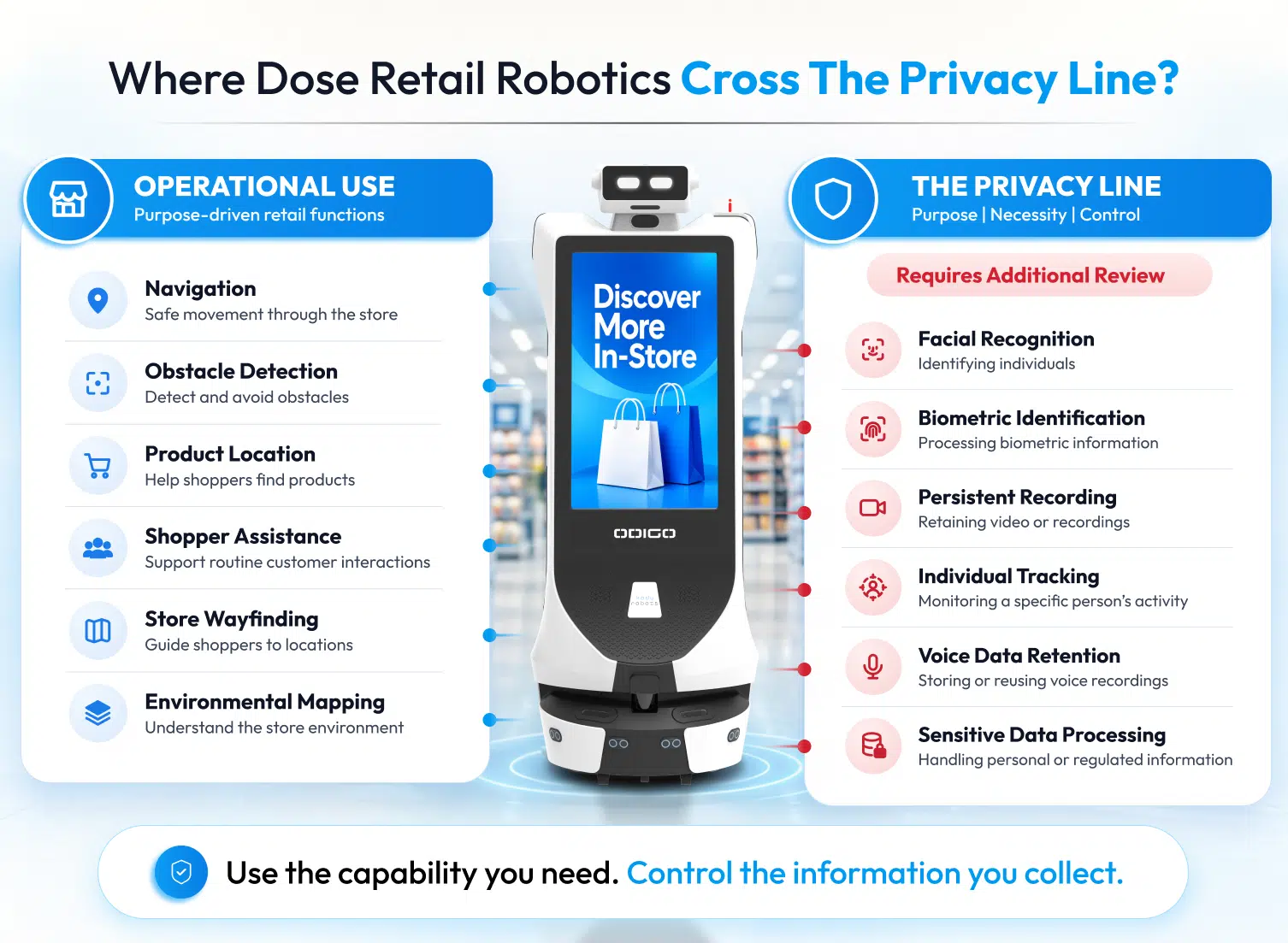
Retailers should treat identification as a separate capability with a higher level of scrutiny. Facial recognition and other biometric functions should only operate when the deployment has a defined purpose, appropriate controls, and location-specific review.
3. Keep Storage and Access Under Control
Local storage deserves the same attention as connected systems. If the system retains camera images, recordings, analytics, or biometric records, the deployment should define who can access the information, how long the system retains it, and when the system deletes it.
Odigo by Kody Robots supports configurable controls for detection categories, retention windows, permissions, recordings, and access according to deployment requirements.
4. Make Privacy Part of the Deployment Configuration
Privacy decisions should not be left until after the robot reaches the sales floor.
Odigo deployments can configure site-level capabilities, including detection and recognition functions, access permissions, and data-handling settings. Location-specific requirements can also influence the approved operating scope.
For US retail deployments, the review may also involve state-specific privacy requirements. Illinois, Texas, and California, for example, have different privacy considerations that may affect how retailers configure camera, biometric, and related data functions.
5. Keep Humans Responsible for Decisions
Retail robotics can support staff with detection alerts, operational insights, and customer assistance. The final decision should remain with authorized personnel when an action affects a shopper.
Odigo’s configured detection capabilities can send alerts to staff for human response rather than automated enforcement.
A Practical Boundary for Retailers
A useful rule for retail robot privacy is simple:
If a capability is not necessary for the approved use case, do not enable it. If a capability is necessary, define how the information is processed, stored, accessed, retained, and governed.
The goal is not to avoid useful sensing technology. The goal is to make every enabled capability intentional, controlled, and appropriate for the environment where the robot operates.
For retailers evaluating Odigo Robot Hardware, privacy review should therefore sit alongside navigation, connectivity, analytics, and operational requirements during deployment planning. A well-defined configuration gives store teams a clearer understanding of what the robot can sense, what information the system handles, and where human oversight remains necessary.
Retail Robot Hardware – General FAQs
Clear answers to common questions about camera data, biometrics, audio, storage, access, and privacy considerations in retail robot deployments.
1. Does retail robot hardware automatically collect biometric data?
No. Retail robot hardware can include cameras, depth sensors, LiDAR, microphones, and other sensing components without automatically performing biometric identification.
Biometric processing depends on the software capabilities enabled, the information processed, and the purpose of the deployment. A camera can capture an image without identifying the person in the image.
2. What information can an in-store robot capture?
An in-store robot can capture different types of information depending on its sensors and configured functions. Cameras can capture visual information, depth cameras can capture spatial information, LiDAR can measure environmental geometry, microphones can receive voice input, and an IMU can provide motion and orientation data.
Odigo Robot Hardware includes 2 Full HD cameras, 3 3D depth cameras, LiDAR, 4 ultrasonic sensors, an IMU, and a 4-microphone array.
3. How does retail robot camera hardware affect shopper privacy?
Retail robot camera hardware can support navigation, visual perception, interaction, and analytics. Privacy considerations depend on how retailers use the cameras and what happens to the resulting information.
Retailers should distinguish temporary visual processing for navigation from functions involving image storage, analytics, recognition, or other forms of personal-data processing.
4. Is local storage a privacy concern for retail robots?
Yes. Local storage can create privacy considerations even when information does not leave the robot.
Odigo includes onboard storage, and camera images are stored locally. The deployment team therefore needs to define access permissions, retention periods, security controls, and deletion procedures.
5. Does LiDAR collect personal information?
LiDAR primarily measures distances and environmental geometry to support mapping, localization, and navigation. LiDAR data serves a different function from camera imagery.
Retailers should still review the complete sensing system rather than assessing one sensor in isolation, because multiple sensor types can work together during autonomous navigation.
6. Does Odigo use microphones?
Yes. Odigo uses a 4-microphone array to support voice interaction and its AI assistant.
Voice functionality introduces a separate privacy consideration because audio input can contain information spoken by shoppers or employees. Deployment teams should define how voice input is processed, whether any audio is retained, who can access related information, and what controls apply.
7. Can retailers control which privacy-related robot functions are enabled?
Odigo deployments support configurable controls for detection categories, recognition functions, recordings, permissions, retention, and access. Site-level settings can be aligned with customer requirements and applicable local rules.
Configuration should be established before deployment rather than treated as a post-installation adjustment.
8. What should retailers review before deploying an autonomous robot?
A retail robot privacy review should cover the complete operating configuration. Key areas include sensor functions, navigation, cameras, microphones, analytics, local storage, network connectivity, remote management, access permissions, retention, and any recognition or biometric capabilities.
The review should also account for location-specific privacy requirements and the retailer’s own policies.
9. Does using cameras in a store mean the robot is performing facial recognition?
No. Camera-based sensing and facial recognition are different capabilities.
A camera may support obstacle detection, visual navigation, person detection, or other computer vision functions without matching a person’s face against an identity database. Facial recognition requires a separate processing capability and should receive additional privacy and legal review where applicable.
10. What is the simplest way to evaluate retail robot privacy?
Start with the relationship between sensor, purpose, information, storage, access, and approved use.
For every enabled capability, retailers should be able to explain why the capability is needed, what information it handles, where the information is processed or stored, who can access it, how long it remains available, and what controls govern its use.
A clear answer across each area gives the deployment team a practical foundation for evaluating retail robot privacy before the robot operates around shoppers.