
Quick Summary: Deploying a retail robot across a large store network involves more than getting the unit onto the sales floor. This robot assistant deployment guide covers the practical requirements for taking Odigo from order confirmation to first-store deployment, preparing the site, assigning operational ownership, and building a repeatable process for a multi-store rollout.
Key Takeaways
- The first Odigo deployment typically takes 20–25 days from order confirmation to a live, tested robot.
- Odigo can be mapped while the store remains open, allowing normal trading operations to continue.
- Store readiness depends on the floor surface, aisle width, charging setup, operating temperature, and Wi-Fi availability.
- Store layout changes can be handled through incremental mapping instead of remapping the entire location.
- The number of robots required depends on the store format, size, operating hours, and floor layout.
- A successful first deployment can establish a repeatable process for rolling Odigo out across additional stores.
A robot can look ready to operate the moment it arrives at your store, but deployment involves much more than putting a unit on the sales floor. A strong robot assistant deployment guide should help you plan for delivery time, mapping, floor conditions, Wi-Fi, charging, store traffic, associate ownership, maintenance, and the process for taking the first store into a wider rollout.
That planning matters in an industry where store teams are constantly changing. In 2025, the U.S. retail trade sector recorded an average of 2.6% quits rate, according to the U.S. Bureau of Labor Statistics. For a large store network, a deployment model that depends on one highly trained associate or a one-time setup can be difficult to scale as store teams’ change.
With Odigo, the first-store deployment typically takes 20–25 days from order confirmation to live, tested operation. After that, additional stores can move through mapping, configuration, and testing as a coordinated rollout rather than repeating the entire process independently.
This guide covers what your store operations, facilities, IT, and procurement teams need to know before committing a location, from the first site assessment through multi-store rollout.
Pilot, Rollout, or One-Off Demo: Which Are You Planning?
For a US grocery, supercenter, or big-box chain, an Odigo deployment usually falls into one of three paths: a single-store pilot, a phased chain rollout, or a one-off demo. The distinction matters because the resources, preparation, and level of coordination are different for each.
A pilot puts Odigo into one live store to evaluate how it performs under normal operating conditions. This is where store operations, facilities, IT, and procurement can validate site requirements, associate ownership, mapping, testing, and day-to-day operations. The robot assistant deployment guide outlines what each team needs to complete before the robot moves from evaluation to a live store.
A phased rollout takes the deployment from that first store to additional locations. Rather than treating every store as an independent installation, Kody Robots can complete mapping for multiple stores, add store-specific routes, advertising zones, and checkpoints, and test the stores as a group. This approach is designed for retailers planning deployment across a larger network.
A one-off demo is different. It is intended to demonstrate Odigo’s capabilities for evaluation and does not represent the preparation required for a production deployment across a store network.
For most large-format retailers considering a long-term deployment, the pilot is the first operational step, followed by a phased rollout. The first store currently takes approximately 20–25 days from order confirmation to a live, tested robot, subject to robot availability. That includes 15–17 days for delivery and 5–7 days for on-site mapping and testing.
If you are still evaluating the technology itself, you can also read more about what is an advertising robot and how it fits into an in-store experience.
Odigo Deployment Timeline: From First Store to Chain Rollout
The 20–25 day first-store timeline starts with delivery, but getting Odigo live involves more than getting the robot through the loading dock. The robot must arrive, the store must be mapped, and the deployment must be tested before it moves into live operation. For a retailer planning beyond one location, the rollout model matters just as much as the first-store timeline.
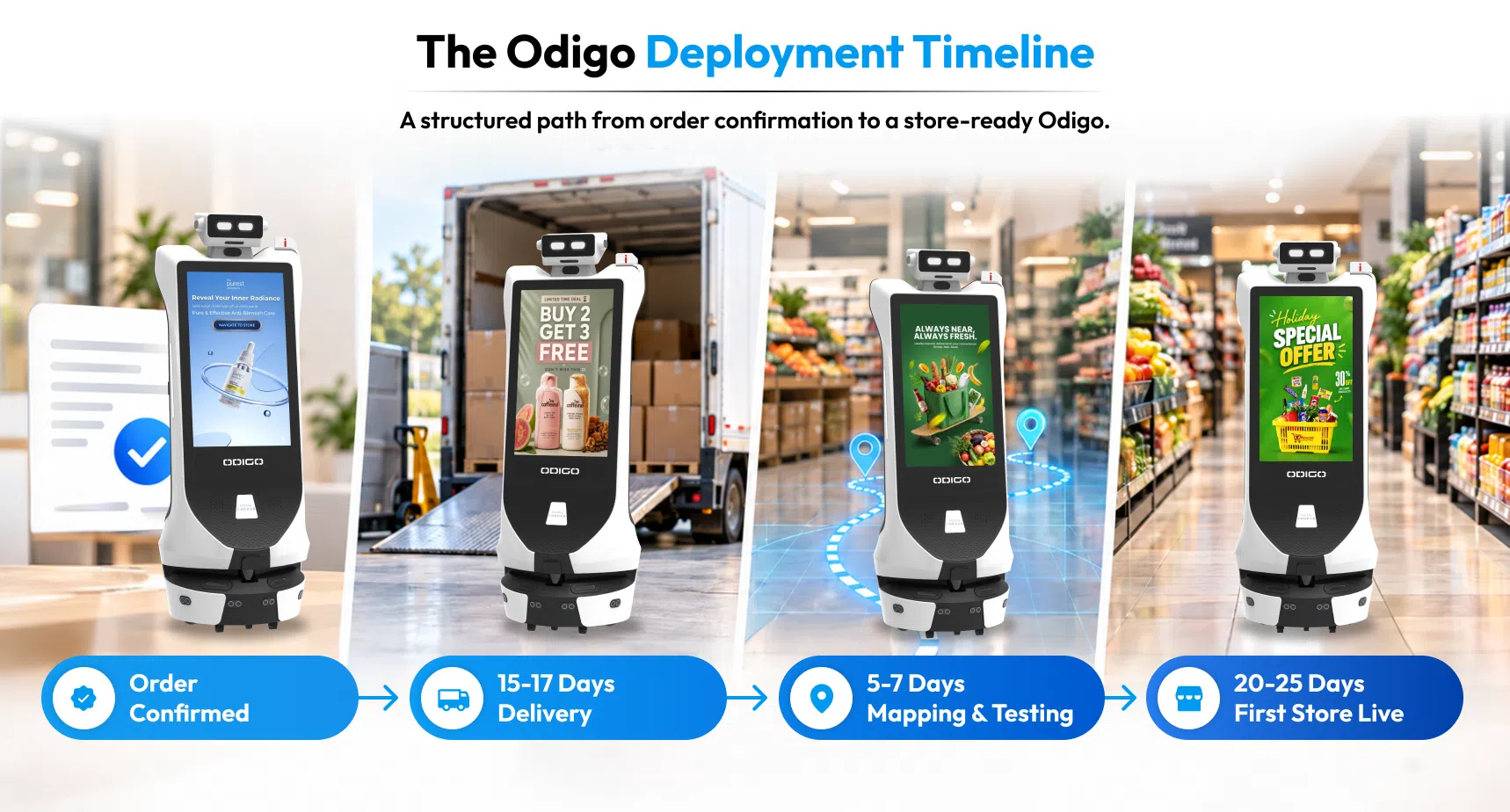
A robot assistant deployment guide should account for each stage, from delivery and mapping to testing and store readiness.
The Complete Robot Deployment Checklist for a Retail Store
| Stage | Elapsed Time | Owner / Responsibility |
| Order confirmation to delivery | 15–17 days | Kody Robots deployment process, subject to robot availability |
| Testing and validation | Included within 5–7 days | Our deployment team, with store coordination |
| First store live | 20–25 days total | Kody Robots team and retailer coordinate deployment and site readiness |
The 5–7-day mapping and testing window begins after the robot arrives at the store. The exact duration within that window depends on the location’s size. Mapping must be completed while the store is open. Kody Robots can schedule the work away from high-footfall periods where possible, but footfall does not determine mapping duration.
The longest defined stage is the 15–17-day delivery period. Robot availability is a stated factor in that estimate.
What Changes After Odigo Deployment in the First Retail Store?
The first store is not simply repeated 20, 50, or 200 times. Once additional stores enter the rollout, Kody Robots uses a batch process:
| Rollout Point | What Happens |
| Store 1: Pilot | Delivery, mapping, store-specific configuration, testing, and launch establish the first deployment. |
| Store 2 | Additional stores move into the coordinated rollout process rather than being treated as completely separate projects. |
| Store 5 | Mapping can be completed across multiple stores, followed by routes, advertising zones, and checkpoints configured for each location. |
| Store 20 | Testing is carried out across the stores as a group rather than completing the entire process sequentially for every store. |
This is where the rollout becomes more efficient. We do not map, test, and launch one store before moving to the next. The team maps each store first, adds store-specific points and advertising zones during the rollout, and then tests the setup across the group. This also gives retailers a consistent foundation for managing retail advertising across multiple Odigo-enabled locations.
For a multi-location retail robot deployment checklist, this means the first store establishes the process, while later stores can move through the same coordinated framework.
For facilities and operations teams, this forms the core robot deployment checklist for moving from order confirmation to a live store.
Vendor Onboarding, Insurance and Site Access
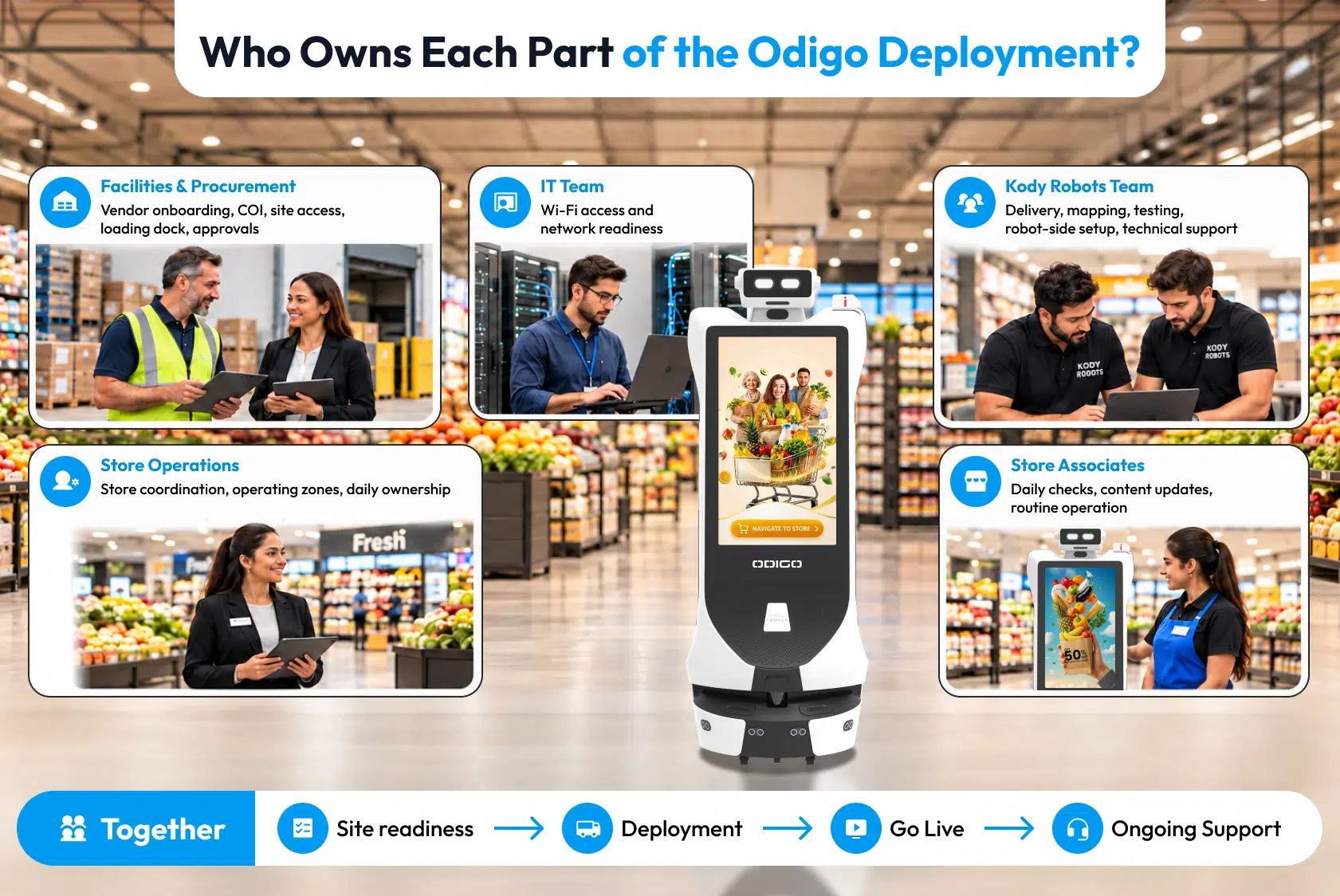
Before the robot reaches the sales floor, procurement and facilities teams need to complete the retailer’s standard vendor requirements. These requirements include a Certificate of Insurance (COI), supplier registration, site access, and any retailer-specific compliance checks.
For insurance and vendor onboarding, we can provide the required Certificate of Insurance (COI) and complete retailer-specific vendor registration or tax documentation such as a W-9 where required. If your property requires additional-insured wording, supplier portal registration, background checks, badging, or a signed vendor agreement, your team should complete each requirement before the scheduled deployment.
If your team needs to protect confidential floor plans or other site information, complete an NDA before sharing those materials.
Procurement and facilities should also coordinate loading dock requirements, including the delivery appointment, site access, and the on-ground contact who will receive the unit.
The risk team should coordinate any required safety sign-off or risk assessment through the retailer’s normal vendor and site-approval process.
The goal is simple: complete procurement, insurance, access, and site approvals before the robot arrives so the Odigo deployment process can move directly into delivery, mapping, and testing.
Site Requirements: What Changes by Store Format?
The store environment affects where Odigo can operate, how facilities teams prepare the site, and how many units the retailer may require. Teams should check these robot assistant setup requirements before scheduling the deployment.
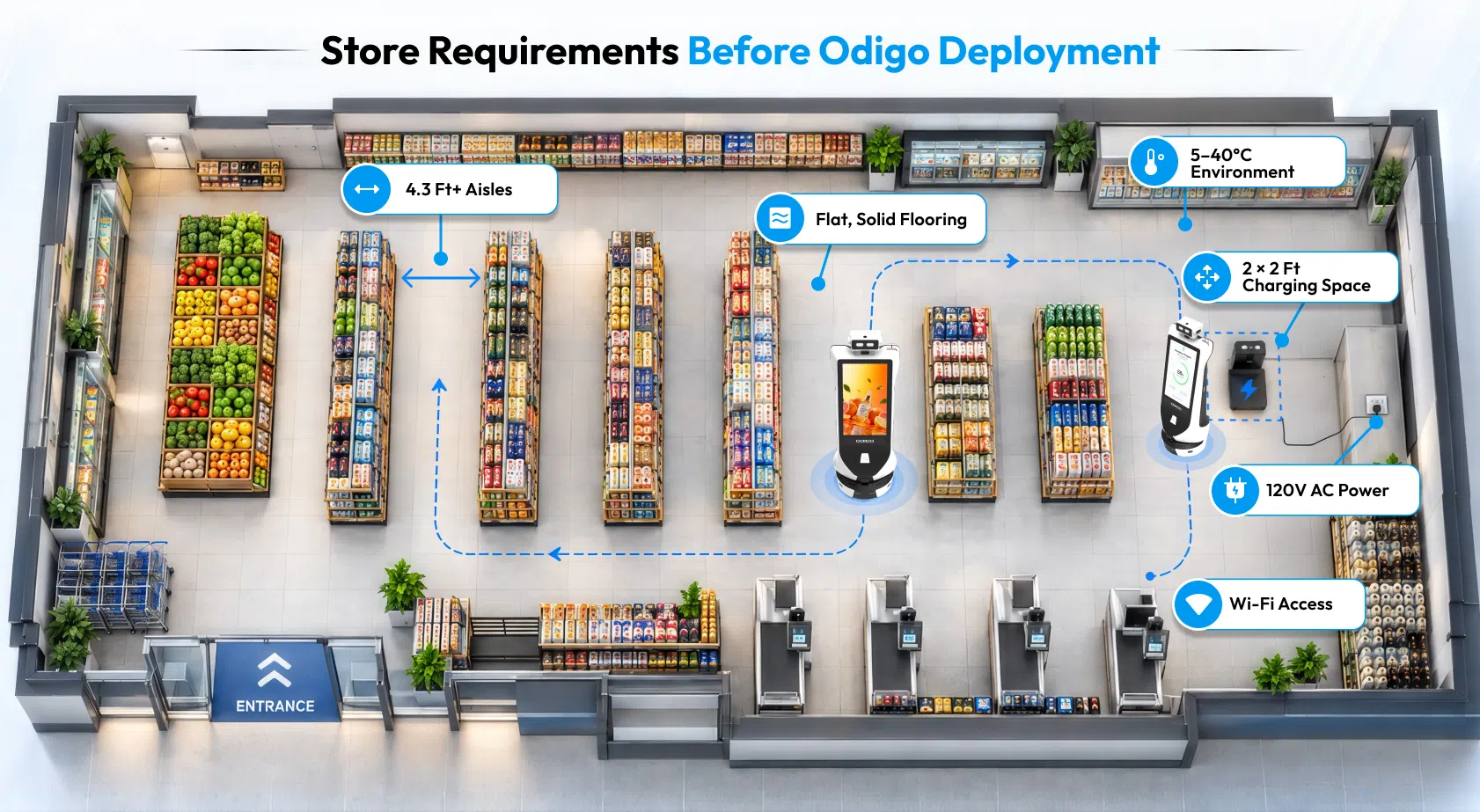
Before scheduling robot installation, facilities teams should confirm the physical conditions at the proposed location. A practical site survey checklist should cover aisle width, flooring, charging access, temperature, operating zones, and areas where the robot will not be permitted.
| Requirement | Grocery | Supercenter | Big-Box |
| Floor surface | Flat, solid indoor surface. No carpet, rough or soft surfaces, slopes, or steps. | Same | Same |
| Minimum aisle width | 4.3 ft (1.3 m) | 4.3 ft (1.3 m) | 4.3 ft (1.3 m) |
| Charging dock & power | 2 × 2 ft footprint; 120V AC, 60Hz, NEMA 5-15 outlet | Same | Same |
| Temperature | Normal, ambient AC-controlled environment | Same | Same |
| Chilled/freezer areas | Not supported | Not supported | Not supported |
| Wet-floor conditions | Detects wet-floor areas, spills, or cleaning activity and routes around them. Hazards can trigger a real-time metric alert to the centralized management dashboard. | Same | Same |
| Forklift & pallet-jack traffic | Virtual walls can restrict backrooms, receiving, and freight corridors. Moving equipment has right of way. | Same | Same |
| Outdoor areas | Not supported | Not supported | Not supported |
| Estimated units by store format | ~60,000 sq ft: 1; 2 if operating 24 hours | ~180,000 sq ft: 2–3 | 2 for big-box, or warehouse club |
Together, these requirements form an Odigo deployment checklist that facilities and operations teams can use before the robot reaches the store.
Plan the Deployment Around Retail Store Operations
The unit counts are estimates, not official Kody Robots sizing guidance. Final requirements depend on sales-floor area, high-traffic zones, advertising volume, operating hours, and battery coverage.
Odigo provides 10+ hours of runtime per charge. A full charge takes approximately 6–8 hours with a 4A adapter or 4–5 hours with a 7A adapter. Extended operating hours may therefore require two units to maintain coverage.
Odigo uses 2D LiDAR with 270° scanning up to 25 m (82 ft) and a front-facing depth camera for obstacle avoidance. However, pallet-jack forks, empty pallets, and flatbed cart decks below 25 cm (9.8 in) may fall outside the detection range. Virtual walls should keep the robot out of backrooms, receiving areas, and freight corridors, and Odigo should not operate during overnight freight-stocking hours. Moving equipment always has the right of way.
In grocery stores, wet floors can result from produce misting, spills, or cleaning cycles. When Odigo identifies these conditions, it can route around the affected area rather than moving through the liquid. It does not clean spills, but its cameras and store-floor monitoring systems can capture the hazard and send a real-time metric alert to the centralized management dashboard.
Network Requirements
Odigo requires basic Wi-Fi connectivity to operate. Your IT team can provide network access through the store’s existing infrastructure without adding specialized connectivity systems or additional security protocols for the robot.
As part of the AI robot deployment checklist, your IT team should confirm Wi-Fi access at each location before the robot arrives.
| Network Requirement | Odigo Requirement |
| Wi-Fi | Basic Wi-Fi access is required for each robot. |
| Authentication | No additional authentication system is required. |
| Security | No additional security protocols are required. |
| Specialized infrastructure | No specialized connectivity infrastructure is required. |
| Network setup | The retailer’s IT team can provide the required network access through the store’s approved Wi-Fi environment. |
| VLAN / SSID | Odigo does not require a dedicated VLAN or SSID. |
| Firewall | No additional firewall infrastructure is required for the robot. |
| Multi-store rollout | Each store needs Wi-Fi access configured before its Odigo deployment. The same approved network approach can then be applied across additional locations. |
For a pilot, your IT team can establish the store’s Wi-Fi access and confirm the approved process for connecting Odigo. Once the team establishes that setup, they can carry the same approach into the wider rollout and avoid creating a separate connectivity process for every store.
The retailer’s IT team establishes approved Wi-Fi access at each deployment location, while the deployment team handles robot-side setup and testing. The IT team needs to ensure that Wi-Fi access is available at each deployment location, while we handle robot-side deployment and testing.
Mapping a Retail Store That Never Closes
Mapping does not require the store to close. Odigo by Kody Robots is mapped while the store is open, allowing you to continue normal trading operations during the process. Where possible, we can schedule mapping away from high-footfall periods to minimize disruption. Footfall itself does not affect the mapping process.
How Long Does Mapping Take?
We have not differentiated mapping duration by square footage. The on-site mapping and testing window usually takes 5–7 days for the first deployment, with the exact duration depending on the location size.
| Store Format | Mapping and Testing |
| ~60,000 sq ft grocery | 5–7 days for the first deployment, depending on location size |
| ~180,000 sq ft supercenter | 5–7 days for the first deployment, depending on location size |
| Big-box | 5–7 days for the first deployment, depending on location size |
The 5–7-day window covers both mapping and testing, starting once the robot arrives at the store.
This stage is an important part of the Odigo deployment process, particularly for retailers planning multiple locations where each store has its own floor layout and operating conditions.
What Happens When the Retail Store Layout Changes?
A weekly grocery reset or seasonal big-box reset does not require the team to map the entire store again. Odigo uses incremental mapping, so the team only needs to update the affected areas on the existing map.
An incremental mapping update takes approximately 30–45 minutes per floor.
This matters if your stores regularly change aisles, displays, departments, or other parts of the sales floor. Instead of repeating the complete mapping process, the affected areas can be updated as the store layout changes.
Incremental remapping is not charged separately. You can confirm the specific process with our team when planning a wider rollout.
Does Odigo Need Item Location or Planogram Data?
Odigo’s physical mapping establishes the store environment and the locations it needs to navigate. Planogram or item-location data is not required for the mapping process itself. When the team configures product locations and store-specific destinations for shopper assistance and digital wayfinding, they can incorporate those details into the store-specific setup.
For a retailer rolling Odigo out across multiple locations, this approach lets the team map and configure each store according to its layout while maintaining a consistent deployment process across the network.
Store Operations: Who Handles Odigo Day to Day?
Once Odigo is live, daily operation should fit into the store’s existing routines rather than become a separate technical responsibility. Basic training is sufficient, and the team can train associates to manage the robot’s routine functions during their shifts.
A practical robot assistant deployment guide should therefore cover who operates the robot after installation, not just how it gets onto the sales floor.
Who Manages Odigo?
Kody Robots trains store associates to:
- Upload content and set robot routes.
- Monitor robot performance.
- Use the PIN-protected operator panel to send Odigo home or to charge.
- Cancel navigation, adjust speed and volume, and relocate the robot on the map.
For day-to-day ownership, the store can assign one named associate per shift, such as a front-end or customer service lead, to manage the robot. Kody Robots provides technical support when an issue needs escalation.
For stores with high associate turnover, new starters who take on this responsibility can receive the same basic training rather than requiring specialist robotics knowledge.
These responsibilities form part of the robot assistant deployment guide because they determine how easily the team can manage the deployment when responsibilities change between shifts.
What Should an Associate Check Each Day?
Before peak hours, the assigned associate should:
- Confirm the battery is at 70% or above.
- Wipe the LiDAR sensors with a microfiber cloth.
- Check the wheels for hair and debris.
- Confirm the screen is on and showing the correct content.
If Odigo stops, the associate should first read the on-screen message and clear the path. Stops are usually caused by a low battery, detected obstacles, or system alerts. If there is an emergency, the red E-stop immediately halts the robot. After releasing it by rotating the button clockwise, a robot that was moved manually while the E-stop was engaged must be relocated on the map.
Where Does It Go Outside Operating Hours?
Odigo can be sent to its charging dock through the operator panel. Stores operating extended hours can use additional units where required to maintain coverage based on battery runtime.
Daily ownership is straightforward: the assigned associate handles routine checks and operation, while Kody Robots remains responsible for technical escalation and support.
Content, Support and Robot Assistant Service
Once Odigo is live, you need a clear split between what your store team manages and what we handle. Your associates can manage routine content and robot operation, while we provide ongoing technical support and preventive maintenance.
Your robot assistant deployment guide should clearly define those responsibilities, so your store team knows what it owns and when to involve our support team.
| Area | What You Can Expect |
| Creative specifications | We provide the required specifications for creative displayed on Odigo’s screen. |
| Content management | Your trained associates can upload approved content and manage robot routes. |
| Content updates | You can update creative as campaigns change, with fleet-level updates coordinated across multiple deployed units. |
| Software support | We provide virtual software support at all times for software-related issues. |
| Hardware support | We target resolution of hardware issues within 5–7 working days. |
| Preventive maintenance | We perform preventive maintenance every 3 weeks to keep your robots in working order. |
| Fleet uptime | A formal uptime SLA is not specified. If your procurement team requires a contractual uptime commitment, we can discuss this during deployment planning. |
Managing Content Across Your Retail Stores
You do not need a technician at every store to manage routine creative updates. Your trained store associates can upload content and manage routes, while campaign changes across multiple deployed units can be coordinated as part of the fleet.
For a multi-store rollout, the exact turnaround for a creative change depends on the campaign and deployment setup. Your team can coordinate the required updates with us when planning fleet-wide campaigns.
The support model keeps day-to-day responsibilities with your store team while we handle technical support and scheduled maintenance. You manage routine operation and approved content; we support the technology and keep the robots maintained.
If you want to understand the technology behind the experience, you can also read more about how AI robot assistants work.
Where Odigo Does Not Fit
Odigo is designed for smooth, indoor, controlled retail environments. You can rule out locations that do not meet these basic operating conditions before scheduling a site survey.
A robot assistant deployment guide should help you screen locations against these requirements before investing time in site surveys and mapping.
Carpet or soft flooring
Odigo requires a flat, solid indoor surface and is not suitable for carpet or rough surfaces.
Slopes and steps
The operating area must have a level floor.
Outdoor areas
Odigo is not designed for garden centers, lumber yards, or other outdoor sales areas.
Chilled and freezer areas
Odigo requires a normal, ambient AC-controlled environment and cannot operate in chilled or freezer sections.
Temperature
The operating environment must remain within 5–40°C (41–104°F).
Narrow aisles
A minimum aisle width of 4.3 ft (1.3 m) is required.
Small-format stores
Odigo is intended for larger retail environments where there is sufficient floor area for navigation and its intended use cases.
Checking these conditions early can help you identify stores that are not suitable for Odigo before committing time to site surveys, mapping, and deployment planning.
Plan Your First Retail Store with the Full Rollout in Mind
Deploying Odigo across a retail network is not simply a matter of finding floor space and switching the robot on. A well-planned robot assistant deployment guide brings facilities, IT, procurement, store operations, and the deployment team into the same process before the robot reaches the store.
For the first location, that means working through the 20–25-day deployment timeline, confirming floor and charging requirements, completing vendor onboarding, providing Wi-Fi access, preparing the store map, and assigning an associate to manage daily operations. Once these steps are in place, the same process can be replicated across additional stores for a smoother, more consistent rollout.
The practical question is not only whether your store can accommodate a robot. It is how Odigo can fit into your store environment, operating schedule, shopper journey, and wider retail strategy.
If you are evaluating Odigo for a grocery store, supercenter, or big-box location, book an Odigo demo to see how the robot can be configured for your store and discuss what your first deployment would require.
You can also explore Kody Robots to learn more about our robotics solutions for retail environments.
Robot Assistant Deployment Guide – General FAQs
The following FAQs cover the practical questions teams usually need to answer before moving from a pilot to full-scale robot assistant deployment.
1: How long does it take to deploy a retail robot in a grocery store?
For the first store, the typical robot assistant deployment guide timeline is 20–25 days from order confirmation to a live, tested Odigo, including 15–17 days for delivery and 5–7 days for on-site mapping and testing.
2: Does the store need to close for robot installation?
Mapping and testing are completed while the store is open. Where possible, the Kody Robots team schedules the work away from high-footfall periods to reduce disruption to normal store operations.
3: What happens when we reset a section or change the planogram?
You do not need to remap the entire store. Odigo Advertising Robot uses incremental mapping, so affected areas can be updated in approximately 30–45 minutes per floor.
4: How many robots does a supercenter need?
For an approximately 180,000 sq ft supercenter, the estimated requirement is 2–3 units. The final number depends on floor area, high-traffic zones, operating hours, advertising volume, and battery coverage.
5: Can Odigo operate around forklifts and pallet jacks?
Yes, with defined operating controls. Virtual walls can restrict access to backrooms, receiving areas, and freight corridors, while moving equipment always has the right of way. Low-profile equipment below 25 cm (9.8 in) may fall outside the robot’s detection range.
6: What does the retailer need to provide for deploying Odigo?
The retailer needs to provide Wi-Fi access, a 120V AC, 60Hz NEMA 5-15 outlet, a 2 × 2 ft charging area, store floor plans, and site access coordination. Your robot deployment checklist should also include vendor onboarding, site access, and the assigned store contact.
7: Who maintains the robot after installation?
We provide preventive maintenance every 3 weeks and virtual software support. For hardware issues, we target resolution within 5–7 working days.
8: Can Odigo work in chilled or freezer sections?
No. Odigo requires a normal, ambient AC-controlled indoor environment and cannot operate in chilled or freezer areas.
9: Can Odigo support a multi-store rollout?
Yes. After the first store, mapping, store-specific configuration, and testing can be coordinated across multiple locations as a batch. This allows the robot assistant deployment guide to be applied consistently across the rollout rather than creating a separate process for every store.
10: What should we evaluate before deploying Odigo?
Review floor conditions, aisle width, operating hours, traffic patterns, charging access, network connectivity, and the store’s intended use cases before finalizing your robot assistant deployment guide for the location.