

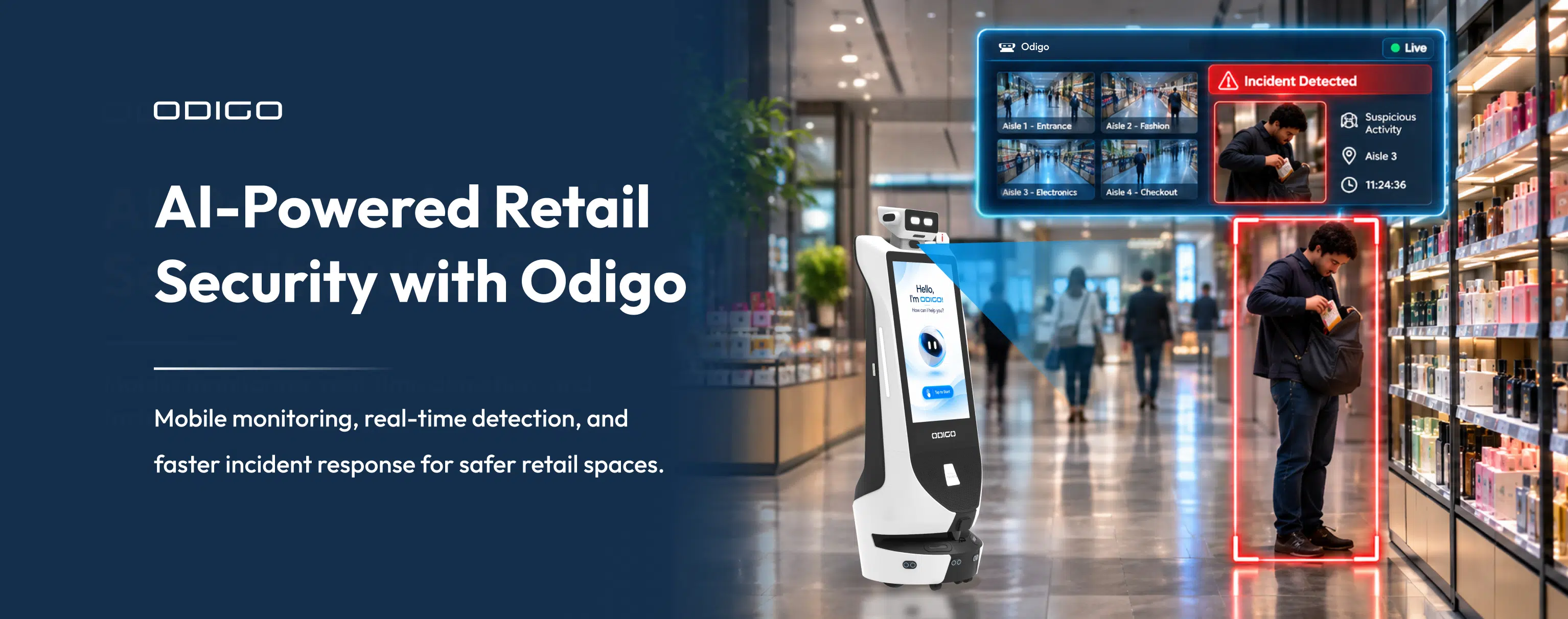

Quick Summary: A retail security assistant robot can give store teams a mobile layer of security and surveillance without limiting monitoring to fixed camera locations. An assistant robot for retail security can support incident detection, restricted-area monitoring, hazard alerts, and live security visibility while keeping detection settings and data access under retailer control. The guide explains what Odigo can monitor, how surveillance works, and where its boundaries sit.
Key Takeaways
- Retail security can extend beyond the fixed view of CCTV when a mobile robot patrols different areas of the store.
- A retail robot can detect defined security events, but the retailer decides which monitoring functions the deployment uses.
- AI alerts can give security teams earlier visibility into incidents without taking human judgment out of the response.
- Facial recognition, video, and other sensitive functions require clear rules for access, retention, and use.
- Robotic surveillance’s real value comes from helping store teams detect, verify, and respond to security events.
Retail Security Beyond Fixed Camera Coverage
Retailers are increasing security investment while dealing with more complex threats. Deloitte reports that three-quarters of retail executives are increasing spending on retail theft prevention, while 80% of shopping still happens in physical stores. NRF’s 2026 research found a 12.4% decline in shoplifting incidents in 2025, but retailers continued reporting organized retail crime, fraud, and violence as significant concerns. (Source: NRF)
Security teams therefore need visibility across the store, not only footage from fixed cameras. An assistant robot for retail security can add mobile monitoring through configured detection, live video, restricted-area alerts, hazard detection, and incident reporting.
Yet capability and control are two different questions. Can a retail robot recognize faces? What does a retail robot camera detect? Does the system record video? Who can access the data?
Odigo’s security capabilities answer those questions at the deployment level, where detection settings, access permissions, and data retention define how retail surveillance operates. The sections ahead examine each area so retailers can understand where robotic surveillance adds security value and where clear operational boundaries remain essential.
What Can an Assistant Robot for Retail Security Actually Monitor?
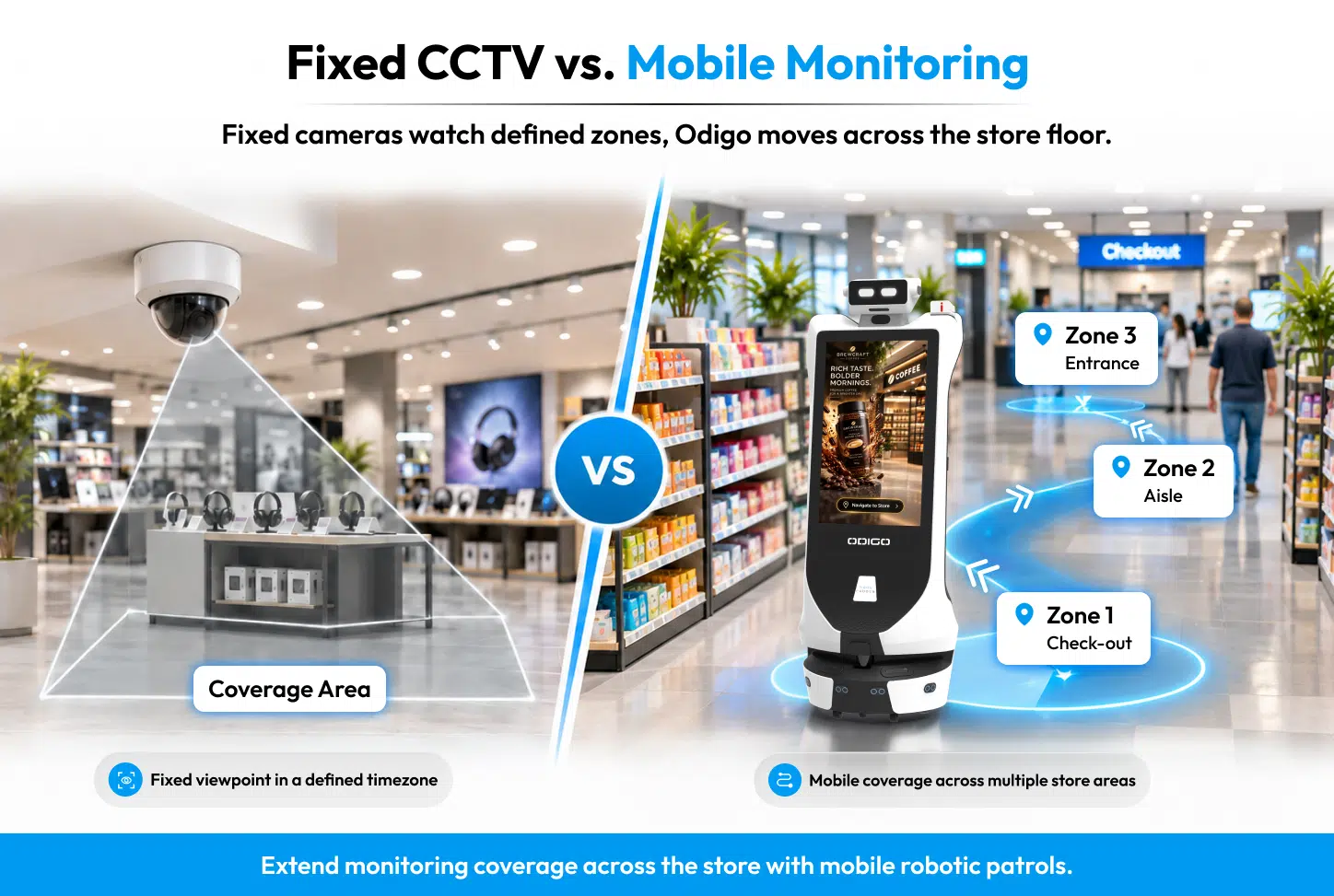
A retail security team needs more than a camera feed. Large stores have entrances, sales floors, stockrooms, restricted areas, and customer-facing zones that require different levels of attention. Fixed cameras provide valuable coverage, but a mobile platform can bring monitoring capabilities into areas where a stationary camera may have limited visibility.
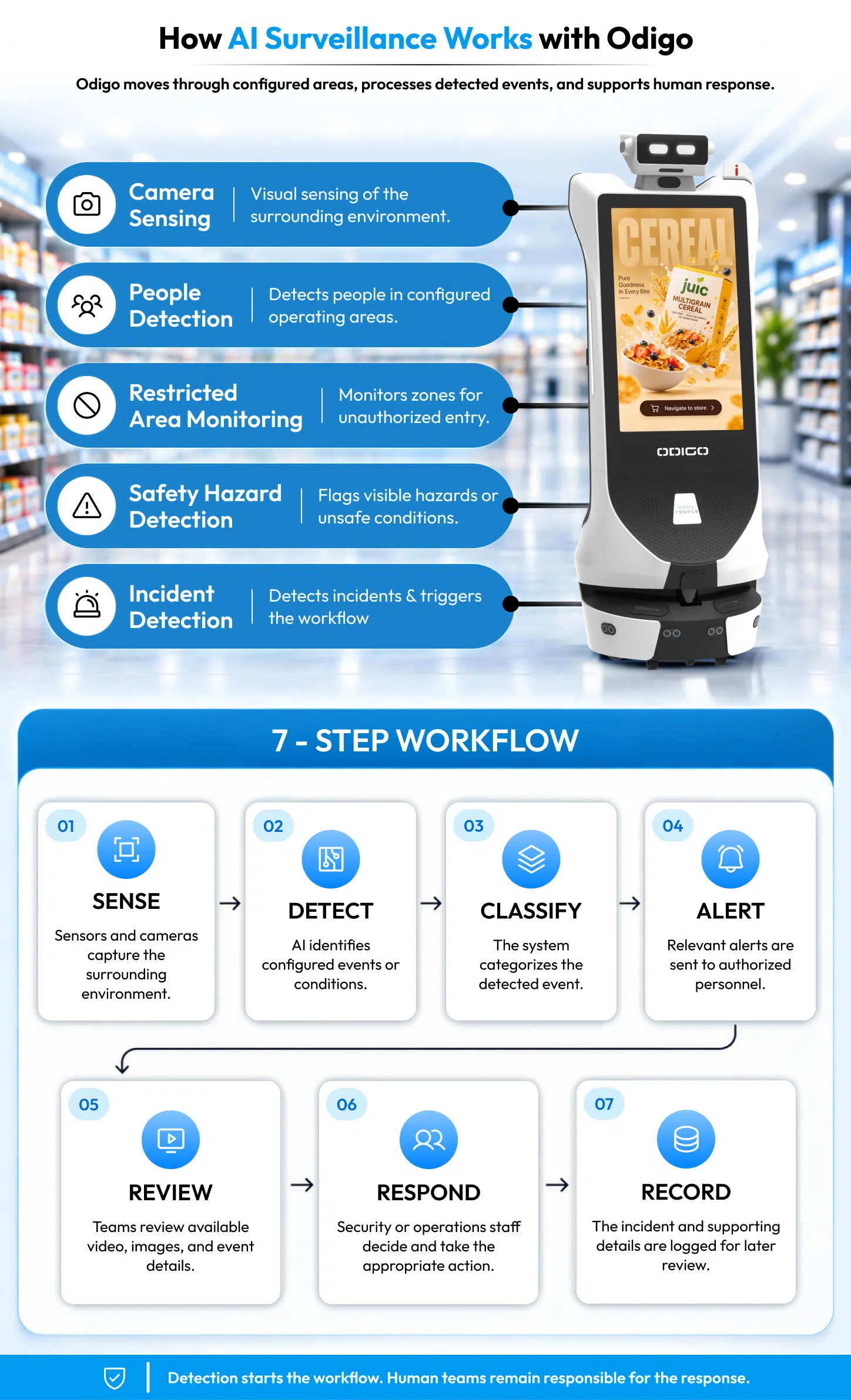
A Robot Assistant for retail security can support retail security & surveillance through configured detection functions, live video, incident alerts, and mobile patrols. Odigo can move through designated areas while its sensors and cameras monitor the environment for specific security and safety conditions.
Human and Unauthorized-Person Detection
Odigo can detect people in its monitored environment and classify them based on configured rules. A retailer can maintain administrator-managed lists for authorized, unauthorized, or blocklisted individuals where the relevant recognition functionality is enabled.
This approach lets security teams define who or what requires attention, rather than treating every person in the store as a security event.
Weapons, Fights, and Security Incidents
Security teams often need rapid awareness of events that demand human intervention. Odigo supports configured detection for weapons, fights, altercations, and other defined incidents.
When a relevant event occurs, the system can generate an alert with detection details, timestamps, and supporting images. Security personnel can review the available information and determine the appropriate response.
The distinction matters for AI retail security solutions. Odigo provides detection and alerting capabilities, while trained personnel remain responsible for assessing the situation and deciding what action to take.
Restricted Areas and Unauthorized Access
Retail stores often contain areas where customer access is limited, including stockrooms, employee-only spaces, service corridors, and other controlled zones.
An assistant robot for retail security can monitor configured restricted areas and generate alerts when unauthorized access is detected. Virtual boundaries and restricted zones can also help define where the robot should operate or avoid during patrols.
Hazards and Store-Safety Conditions
Retail surveillance does not have to focus only on theft or security incidents. Store conditions can also create operational and safety risks.
Odigo can detect configured hazards such as spills, fallen products, blocked paths, and obstructed exits. The system can generate help tickets when supported hazards are identified, giving store teams a clearer path from detection to action.
Compliance-related monitoring can also identify conditions such as missing signage or blocked accessible pathways, with timestamped photographic evidence available for review.
Live Monitoring and Incident Evidence
Odigo can provide live video from connected cameras and maintain searchable recording history according to the deployment configuration. Security teams can filter alerts and recorded events by factors such as robot, camera, date, and detection category.
Such capabilities give retail security teams more context around an event instead of relying only on a notification. A security manager can review what happened, when the event occurred, and which robot or camera captured the relevant evidence.
The broader value of robot assistants in retail industry lies in combining movement, sensing, detection, and reporting within one operational workflow. Odigo does not need to replace existing cameras to add value. A mobile security layer can extend monitoring into designated areas while existing security infrastructure continues to serve its role.
Can Retail Robots Recognize Faces, Record Video, or Track Shoppers?
Questions around cameras and shopper data often determine whether a retailer is comfortable deploying an assistant robot for retail security. A retail robot camera can support several functions, but each function has a defined purpose and depends on the configuration selected for the site.
Can Retail Robots Recognize Faces?
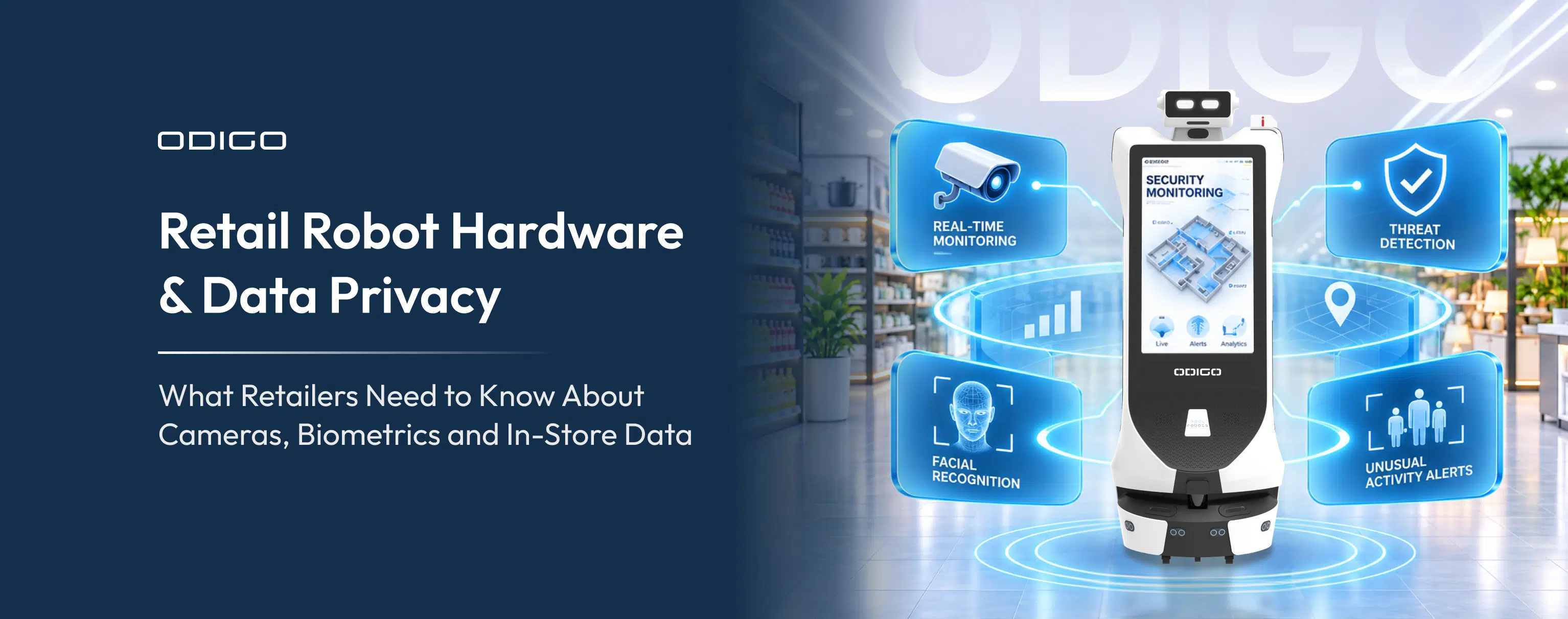
Yes, an assistant robot for retail security can support facial recognition in retail when the relevant functionality is enabled. The system can compare detected faces against an administrator-managed list and classify matches according to the rules configured for the deployment.
Facial recognition should therefore be treated as a specific security function, not as a default capability applied to every person entering a store. Retailers can define whether recognition is enabled and establish the access controls and data-handling rules surrounding recognition records.
For security teams, the distinction matters. Person detection answers whether someone is present. Facial recognition addresses whether a detected person matches an authorized or configured identity record.
Do Retail Robots Record Video?
Odigo Robot Privacy is an important consideration when live video and recording capabilities are configured for retail security. Odigo can provide live video from connected cameras and maintain recording history according to the deployment configuration. Security personnel can review available footage using filters such as robot, camera, date, and detection category.
Video can also support incident review. When a configured detection event occurs, the system can associate the event with supporting images and a timestamp, giving security teams additional context for investigation and response.
Retail robot surveillance therefore involves more than watching a live feed. The operational value comes from connecting visual information with a specific event, location, time, and response process.
Can a Retail Robot Track Shoppers?
The answer depends on what the retailer means by “track.”
A security deployment can detect people and monitor configured events without automatically creating an individual shopper-tracking system. Separate analytics functions may support information such as footfall, dwell patterns, demand zones, or visitor interactions when those capabilities are configured for the use case.
The distinction is important for retail robot privacy. A retailer should define the purpose of each camera and analytics function before deployment, including what information the system needs, who can access the information, and how long records remain available.
A strong assistant robot for retail security should therefore be evaluated according to its configured use case rather than a broad assumption that every camera continuously identifies or follows every shopper.
What Does the Retailer Control?
The security profile of robots in stores depends partly on configuration. Retailers can determine which supported functions are enabled, establish access permissions, and define applicable data-retention settings.
Such controls help separate three questions that often get mixed together:
What can the robot detect? → What has the retailer enabled? → What can security personnel access and act on?
A clear answer to all three questions gives retailers a more practical way to evaluate retail robot data privacy before deployment.
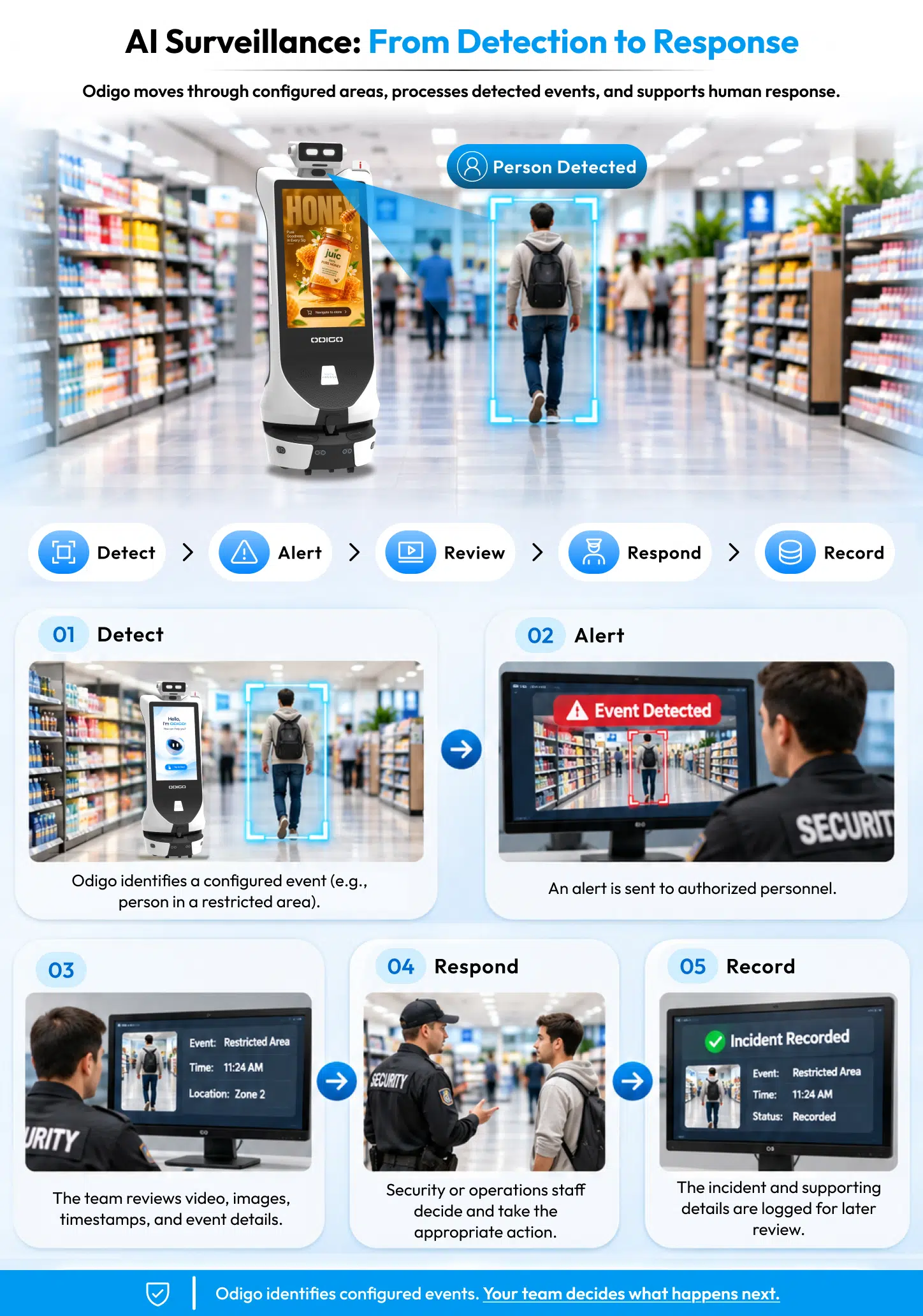
From Detection to Response: How AI Retail Security Works
The value of an AI surveillance robot does not come from detection alone. A useful security system needs to connect an event with the information security personnel need to assess the situation and decide what happens next.
Odigo supports a workflow that can be understood as:
Sense → Detect → Classify → Alert → Review → Respond → Record
Sense and Detect
Odigo uses its cameras and onboard sensors to monitor configured areas during autonomous patrols. The system can identify supported conditions such as human presence, restricted-area access, weapons, fights, altercations, hazards, and other configured detection categories.
The robot can patrol designated zones rather than remaining fixed at one location. Such mobility can extend retail surveillance into areas where a fixed camera may not provide the same coverage.
Classify and Alert
Once a supported condition is detected, Odigo can classify the event according to the configured detection function and generate an alert.
Security teams can filter live alerts by factors such as:
- Robot
- Camera
- Date
- Detection category
The approach helps security personnel distinguish relevant events from routine activity and focus attention where an operational response may be required.
Review the Available Evidence
An alert alone rarely gives security personnel enough context to make a decision. Odigo can provide supporting images, timestamps, and live video from connected cameras. Recording history can also be searched and reviewed according to the deployment configuration.
For retail security systems, the connection between an alert and supporting evidence matters because personnel can assess the event before deciding on an appropriate response.
Respond Through Human Oversight
As an assistant robot for retail security, Odigo is designed to support security personnel rather than independently enforce security rules.
A detected weapon, altercation, unauthorized-access event, or other alert does not automatically mean the system takes enforcement action. Security personnel remain responsible for assessing the situation and following the retailer’s established response procedures.
The same principle applies to suspicious-activity or theft-related alerts. Such alerts can assist staff while the retailer determines the appropriate response.
Record and Review Incidents
Incident records can retain detection details, timestamps, classifications, and supporting images according to the configured deployment.
Security teams can use the information for incident review, investigation, and operational reporting. Connected robots can also provide a broader monitoring layer, allowing teams to review events across multiple locations or units through a central interface.
The strongest AI retail security solutions therefore connect detection with a defined response process. A robot can identify and report a configured condition, but effective security still depends on clear rules, trained personnel, and appropriate human judgment.
What Odigo Does Not Do: Understanding the Limits of Robotic Surveillance
A retail security robot needs clearly defined boundaries to earn trust. Odigo can extend mobile monitoring across designated areas, but an assistant robot for retail security does not replace a retailer’s CCTV network, security personnel, or established response procedures.
The more useful question is where robotic monitoring fits within the wider security operation.
Odigo Does Not Replace CCTV
Retail robot hardware is designed to work alongside existing retail security systems rather than replace fixed surveillance cameras.
A fixed camera continues monitoring a defined viewpoint. Odigo can patrol designated areas and bring camera-based monitoring into locations beyond the reach of stationary equipment. A retailer can therefore add mobile coverage without rebuilding the existing surveillance infrastructure.
The combination also gives security teams different types of visibility. Fixed cameras provide persistent views, while a mobile unit can move through selected zones during normal patrol activity.
Odigo Does Not Independently Enforce Security Rules
Odigo can generate assistive alerts for configured security events, including theft-related or suspicious activity. The robot does not independently confront, detain, accuse, or penalize a person. Robot network configuration can define how supported security functions operate within the broader deployment.
Security personnel remain responsible for reviewing an alert and following the retailer’s established response procedures. Such separation matters for anti-theft retail security, where an automated detection should support trained personnel rather than substitute for human judgment.
Odigo Does Not Automatically Apply Every Detection Function
A camera-equipped robot does not mean every available detection capability operates continuously.
Odigo’s facial recognition and individual detection classes can be enabled or disabled for each site. Camera functions also remain scope-limited and mode-specific according to the deployment configuration.
The distinction matters for facial recognition in retail. An assistant robot for retail security can be configured around specific recognition or detection functions that serve a legitimate operational purpose, rather than treating every available capability as mandatory.
Odigo Does Not Limit Security Operations to Surveillance Alerts
The more distinctive value of robotic monitoring appears when security functions connect with other store operations.
Odigo can support a distributed search for a lost person or lost child across connected units at the same site. Once a search is initiated, the reported profile can be pushed across the fleet while units continue normal operation.
Emergency broadcast and two-way intercom also give operators a way to communicate with people near the robot’s location. Such capabilities can matter during situations where locating or communicating with someone matters as much as identifying an incident.
Odigo Does Not Treat Safety and Compliance as Separate From Store Security
A store’s security environment includes physical conditions that can create safety, accessibility, or operational risks.
Odigo can scan for configured conditions such as spills, fallen products, blocked paths, and obstructed exits. Supported hazard detections can trigger automatic help-ticket generation, giving store teams a direct operational follow-up.
Compliance patrols can also log blocked exits, missing signage, and obstructed accessible paths with timestamped photographic evidence.
For retailers, the distinction expands the role of an AI surveillance robot beyond conventional surveillance. A mobile unit can support security monitoring while also creating documented workflows for hazards and compliance conditions.
Odigo Does Not Leave Data Access Undefined
Privacy controls form another important boundary. Odigo supports configurable data-retention windows, allowlisting, and access paths. Granular permissions can govern who can view recordings, recognition data, detection events, and intercom functions.
Recordings and biometric records can be held on customer-controlled infrastructure according to the deployment configuration.
For an assistant robot for retail security, such controls give retailers a practical governance layer around retail robot data privacy. Security teams can define who receives access and how long relevant records remain available instead of treating data governance as an afterthought.
The Real Boundary: Capability Without Overreach
Odigo can extend mobile security coverage, identify configured conditions, provide incident evidence, support distributed searches, facilitate emergency communication, and document selected safety and compliance issues.
The robot does not independently decide what a security team should do with an alert. It does not replace the broader surveillance infrastructure, and it does not automatically activate every available detection capability.
For a retailer evaluating in-store robot data collection, the strongest deployment model is therefore one where the robot has a defined operational role, clearly configured functions, controlled data access, and established human response procedures.
How an Assistant Robot for Retail Security Handles Retail Robot Privacy
A retail robot operating across a busy store can interact with thousands of people and generate operational records throughout the day. For an assistant robot for retail security, privacy planning needs to cover more than the camera itself. Retailers need to understand what information a deployment can generate, which functions require access, and how long relevant records remain available.
The operational scale of Odigo deployments makes the question more important. The destination-wise analytics dataset contains 61 robot-level records across 13 retail destinations, with more than 1 million recorded user interactions and approximately 25,971 kilometers of total robot movement. The figures represent overall robot activity, not security detections, but they illustrate how much operational activity a multi-location fleet can generate.
What Information Can a Retail Robot Generate?
The answer depends on the functions enabled for the deployment.
Security-related functions can involve detection events, timestamps, supporting images, live video, recording history, and recognition data where facial recognition is enabled. Other configured functions can generate operational information such as user interactions, navigation activity, help tickets, and patrol-related records.
A retailer therefore needs to separate retail robot camera data from broader operational analytics. A camera may support security detection, while interaction or navigation systems can generate a different category of information.
Does Every Deployment Collect the Same Data?
No. Odigo’s camera functions are scope-limited and mode-specific according to configuration. Facial recognition and individual detection classes can be enabled or disabled at the site level.
Such controls matter for retail robot data privacy because a retailer can define the functions required for a particular operating environment instead of treating every available capability as necessary.
A wayfinding deployment, for example, may have a different data profile from a security-focused deployment. A retailer using engagement analytics may also have different governance requirements from a site using only navigation and advertising functions.
Who Can Access Security Data?
Access does not need to be identical for every employee or operational role.
Odigo supports granular permissions governing access to recordings, recognition data, detection events, and two-way communication. User management and role-based permissions can also be configured through the central command environment.
Such separation is particularly relevant when an assistant robot for retail security operates across multiple stores. A security manager may require access to incident records, while other personnel may only need operational information related to their assigned robot or site.
How Long Is the Data Retained?
Odigo supports configurable data-retention windows, giving retailers a mechanism to define how long applicable records remain available.
Retention should match the purpose of the data. Incident records may require a different retention approach from routine operational analytics. Recognition data may also require stricter governance than ordinary robot activity records.
A strong retail robot privacy review should therefore document the purpose, access path, and retention period for each relevant data category before deployment.
Where Are Recordings and Biometric Records Held?
The Odigo customer-facing specification states that recordings and biometric records can be held on customer-controlled infrastructure. Access permissions can also govern who can view recordings, recognition data, detection events, and intercom functions.
For enterprise retailers, control over storage and access provides an important governance layer. Security teams, IT teams, and privacy stakeholders can establish responsibilities around the information generated during robotic operations rather than leaving ownership and access undefined.
Privacy Should Follow the Use Case
Retailers should evaluate privacy according to what the robot is actually being asked to do.
A deployment focused on mobile wayfinding has a different data profile from one using facial recognition, incident recording, or shopper analytics. The technical platform may remain the same while the information requirements, access rules, and retention considerations change.
For facial recognition in retail, the review should therefore address the recognition list, permitted users, access permissions, retention period, and applicable legal requirements. For ordinary mobile monitoring, the review can focus on the relevant detection classes, video access, incident records, and retention controls.
The practical objective is simple: every data category should have a defined purpose, an assigned access path, and a documented retention rule before the robot enters live store operations.
Retail Robot Privacy: What Data Does Odigo Collect and Who Controls It?
Retail robot privacy depends on the information a deployment generates, the purpose behind each data category, and the people authorized to use the information. A security deployment can create a different data profile from a wayfinding or shopper-engagement deployment.
Odigo deployment analytics show the potential operational scale. The available dataset covers 61 robot records across 13 retail destinations, with more than 1.02 million user interactions and 25,970.85 kilometers of total robot movement. Those figures represent overall robot activity, not security events or privacy incidents.
For retailers, the important question is therefore not simply how much data a robot can generate. The stronger question is whether every data category has a defined purpose, access rule, and retention decision.
What Data Does a Retail Robot Generate?
A retail robot can generate several categories of information during normal operation, depending on the functions enabled at the site.
Operational data can include navigation requests, successful and failed routes, user interactions, patrol activity, and help tickets.
Security data can include detection events, timestamps, supporting images, live video, and incident records when relevant security functions are enabled.
Recognition data requires separate consideration when facial recognition or another recognition function forms part of the deployment.
Analytics data can include footfall, dwell activity, demand hotspots, and other configured retail intelligence signals.
Separating those categories helps a retailer apply the right controls to each type of information rather than treating every robot-generated record as the same kind of data.
Who Should Have Access to Retail Robot Data?
Access should follow job responsibility.
Security personnel may need access to incident events and relevant video. Store operations teams may need operational analytics or help-ticket information. IT and system administrators may manage user permissions, integrations, and technical settings.
A retailer should define access around actual responsibilities rather than giving every user the same visibility. Odigo supports granular permissions for recordings, recognition data, detection events, and intercom functions, allowing access to be managed according to the deployment structure.
The same principle applies across multiple stores. A regional security administrator may require broader visibility than a store-level user, while an associate handling shopper assistance may need access only to the information required for the assigned task.
How Long Should Retail Robot Data Be Retained?
Retention should follow purpose.
An incident record may need to remain available long enough for investigation and internal review. Operational analytics may serve a different reporting cycle. Recognition-related information can require additional scrutiny because of the nature of the data involved.
Retailers should therefore define retention periods before deployment rather than allowing records to remain available indefinitely. The policy should identify the data category, business purpose, responsible owner, retention period, and deletion or review process.
Odigo supports configurable retention windows, giving the retailer a defined control point for the information generated during operation.
What Should Retailers Document Before Activation?
A practical retail robot privacy review can use five decisions:
- Purpose: Why does the deployment need the information?
- Data category: What information will the configured functions generate?
- Access: Which roles need to view, manage, or respond to the information?
- Retention: How long should each category remain available?
- Governance: Where will relevant records reside, who owns the policy, and how will access be reviewed?
The deployment should also account for applicable privacy and biometric requirements when functions such as facial recognition are enabled. Legal and privacy teams should review the operating scope before activation, particularly in jurisdictions with specific requirements for biometric or video data.
A strong retail robot privacy program therefore starts before the first patrol. The retailer defines the purpose, limits the data collection to the required functions, assigns access according to responsibility, and establishes retention rules before live operation begins.
How to Evaluate an AI Retail Security Robot Before Deployment
Choosing an AI retail security robot requires more than checking the camera specifications or counting available detection features. Retailers evaluating an assistant robot for retail security need to consider how the system fits the store, the security workflow, the existing technology environment, and the responsibilities of the people using the alerts.
A useful evaluation starts with the operating environment.
Start With the Store Environment
Map the areas where mobile monitoring could add value. Entrances, sales floors, high-traffic zones, restricted areas, stockrooms, and service areas may have different security requirements.
Review aisle widths, floor conditions, peak traffic periods, charging locations, network availability, and areas where robotic movement should be restricted. Odigo supports virtual walls and restricted zones, while deployment planning also considers floor plans, network access, operating hours, and ADA clearance.
The physical environment determines where an autonomous security platform can operate effectively and where fixed security infrastructure may remain more appropriate.
Define the Security Problems You Need to Solve
A retailer should identify the operational problem before selecting the detection function.
For example, a store may need mobile coverage for restricted areas, faster awareness of incidents, hazard monitoring, or additional visibility during patrol rounds. Another location may prioritize emergency communication or distributed search support.
Each requirement should have a defined response. An alert has limited operational value if nobody owns the follow-up.
A simple evaluation framework can connect:
Security requirement → Detection or monitoring function → Responsible team → Required response → Evidence or outcome
The framework keeps technology selection tied to an actual store process rather than a feature checklist.
Check How the Robot Fits Existing Security Systems
An AI retail security robot should complement the security infrastructure already operating across the property.
Review how the deployment will work alongside fixed cameras, access-control systems, incident-management processes, communication channels, and existing security personnel.
IT and security teams should also confirm network requirements, user management, remote monitoring, and any required integrations before deployment.
The goal is a connected security workflow where mobile monitoring adds useful coverage without creating a separate system that staff rarely use.
Test the Alert Workflow Before Full Deployment
A successful pilot should test more than whether the robot detects a configured event.
Security teams should examine the complete operating sequence:
Detection → Alert delivery → Staff review → Response → Incident record
Test scenarios can include restricted-area access, detected hazards, emergency communication, and other site-specific requirements.
The review should measure alert relevance, response time, escalation procedures, evidence availability, and staff workload. False or low-value alerts can create alert fatigue, while poorly routed alerts can delay an otherwise useful response.
Establish Success Measures Before Go-Live
Retailers should define measurable objectives before deployment.
Useful measures can include:
| Evaluation area | What to measure |
| Coverage | Patrol areas and scheduled monitoring activity |
| Alert performance | Relevant alerts received and reviewed |
| Response | Time between alert delivery and staff action |
| Incident management | Completeness of incident records and supporting evidence |
| Operations | Uptime, charging performance, and maintenance requirements |
| Staff workflow | Time spent reviewing and responding to alerts |
| Privacy governance | Access reviews, retention compliance, and configured data controls |
Operational metrics should be interpreted alongside security outcomes. More alerts do not automatically mean better security. A stronger result may come from fewer irrelevant alerts, faster response, better evidence, or improved coverage of previously underserved areas.
Review the Deployment With the People Who Will Use It
Security managers, store operations teams, IT administrators, privacy stakeholders, and frontline personnel may evaluate the same deployment differently.
Security teams need useful alerts and clear response procedures. IT teams need reliable network and system integration. Privacy stakeholders need documented data practices. Store leadership needs a clear understanding of cost, operational impact, and business value when evaluating an assistant robot for retail security.
Include each stakeholder before full rollout. A technically capable deployment can still underperform when ownership, training, or escalation procedures remain unclear.
The strongest evaluation therefore asks a practical question: Can the retailer define where the robot operates, what the security team expects from the system, who responds to each alert, and how success will be measured?
A clear answer gives the deployment a stronger foundation than a feature list alone.
How to Evaluate an AI Retail Security Robot Before Deployment
An AI retail security robot should earn its place in a store through a clear operational case. Retailers evaluating an assistant robot for retail security need to determine whether mobile security coverage solves a defined problem, fits existing workflows, and gives security teams useful information at the right time.
A practical evaluation can follow five questions:
- Where is the coverage gap?
- What needs to be detected?
- Who responds to the alert?
- What evidence does the response require?
- How will the retailer measure improvement?
1. Identify Where Fixed Surveillance Leaves Gaps
Start with the store floor rather than the robot.
Map entrances, sales floors, stockrooms, restricted areas, high-traffic zones, service areas, and other locations where security teams need visibility. Review areas where fixed cameras have limited coverage or where physical patrols consume significant staff time.
Store layout also matters. A mobile platform needs suitable aisle clearance, safe operating paths, network access, charging access, and defined restricted zones. Odigo supports virtual walls and restricted zones, while deployment planning considers floor plans, operating hours, network requirements, and ADA clearance.
The output should be a coverage map, not a list of desired features.
For each area, document:
- Current security coverage
- Existing blind spots
- Patrol frequency
- Common incidents or operational concerns
- Required response
- Potential value of mobile monitoring
A retailer can then identify where robotic patrol adds meaningful coverage instead of duplicating existing infrastructure.
2. Match Each Security Need to a Defined Function
Security teams should connect every requirement with a specific capability.
A restricted-area concern may require unauthorized-access detection. A weapons concern may require configured weapon detection. Incident response may benefit from live video, time-stamped evidence, and searchable recording history. A safety program may prioritize spills, fallen products, blocked paths, or obstructed exits.
The evaluation should also distinguish between detection capability and business response.
For example:
| Retail requirement | Relevant capability | Operational owner | Expected response |
| Restricted-area monitoring | Unauthorized-access detection | Security | Review and investigate |
| Incident awareness | Incident detection and live video | Security | Assess and escalate |
| Safety monitoring | Hazard detection | Store operations | Correct the hazard |
| Emergency communication | Broadcast and two-way intercom | Security / Operations | Communicate with people onsite |
| Lost-person support | Distributed search | Security | Coordinate search activity |
A feature earns operational value only when the retailer knows why the feature is enabled, who receives the resulting information, and what action follows.
3. Evaluate the Alert, Not Just the Detection
A security robot can identify an event, but security teams still need to determine whether an alert deserves attention.
Pilot testing should therefore measure alert quality alongside detection capability.
Review:
- How quickly an alert reaches the responsible team
- Whether the alert contains enough context for review
- Whether supporting images or video are available when configured
- How easily staff can locate the relevant incident
- Whether escalation procedures are clear
- How often alerts require unnecessary investigation
Alert volume alone is a weak success metric. A deployment producing hundreds of alerts can create additional workload if staff cannot distinguish meaningful events from low-value notifications.
A better evaluation asks whether the system helps security personnel notice relevant events, review evidence, and respond with less uncertainty.
4. Test the Evidence Chain During a Pilot
Security leaders should test real scenarios before approving a broader rollout.
Create controlled test cases around the functions selected for deployment. A restricted-area scenario, for example, should test detection, alert delivery, evidence review, staff escalation, and incident documentation.
The same approach can apply to other configured functions.
The pilot should answer practical questions:
- Can the responsible employee receive the alert?
- Can security personnel identify the location and event category?
- Can supporting evidence be reviewed?
- Can staff follow the established escalation process?
- Does the incident record contain enough information for later review?
- Does the workflow fit existing security procedures?
A successful pilot therefore measures workflow performance, not simply whether a detection appeared on screen.
5. Establish a Baseline Before Measuring Impact
Retailers should record current conditions before deployment.
Useful baseline measures can include:
- Patrol frequency and coverage
- Time spent on manual patrols
- Existing incident-response times
- Number and type of security events
- Areas receiving limited monitoring
- Staff workload associated with routine monitoring
- Existing surveillance and security-system coverage
After deployment, comparable measures can show where mobile monitoring adds operational value.
Odigo’s available deployment analytics demonstrate why measurement needs a defined scope. The dataset covers 61 robot records across 13 retail destinations, with more than 1.02 million user interactions and 25,970.85 kilometers of total robot movement. Those figures describe overall robot activity rather than security-event performance, so retailers should not present interaction volume or distance traveled as proof of improved security.
A stronger business case connects coverage, response, evidence, and operational workload.
6. Review Privacy and Access Before Activation
Security evaluation should include data governance before live operation begins.
Retailers should document which detection, recognition, recording, and analytics functions are enabled at each site. Access permissions, retention periods, responsible teams, and applicable privacy requirements should also be defined before activation.
Odigo supports configurable retention windows and granular permissions for recordings, recognition data, detection events, and intercom access. Availability of individual detection, recognition, and data-capture functions depends on site configuration, customer policy, and applicable local requirements.
A site using facial recognition requires a different privacy review from a deployment focused only on mobile patrols and incident detection. Security architecture and privacy governance therefore need to be evaluated together.
7. Use a Go/No-Go Scorecard
A retailer can bring the evaluation together with a simple deployment scorecard.
| Evaluation area | Go condition |
| Coverage | Mobile monitoring addresses a documented coverage gap |
| Use case | Each enabled function has a defined operational purpose |
| Response | Every important alert has a responsible owner |
| Evidence | Security personnel can access the information required for review |
| Integration | Network and required system connections are ready |
| Privacy | Access, retention, and configured data functions are documented |
| Operations | Staff can operate alongside the robot without unnecessary workload |
| Measurement | Baseline metrics exist for post-deployment comparison |
A deployment should move forward when the technology, workflow, governance model, and measurement plan work together.
The strongest evaluation does not ask whether a retail security robot has enough features. It asks whether a retailer can prove where mobile monitoring adds coverage, define what happens after an alert, control the resulting data, and measure the operational outcome.
That standard gives security leaders a more defensible basis for deployment decisions and helps separate useful robotic surveillance from technology purchased simply because the feature list looks impressive.
What Retailers Should Expect From Robotic Security
An assistant robot for retail security can extend mobile monitoring across areas where fixed surveillance or manual patrols may leave gaps. Odigo supports configured functions such as incident detection, unauthorized-access monitoring, live video, hazard detection, and emergency communication.
The real value depends on how well robotic monitoring fits the retailer’s security workflow. Clear use cases, defined human response, controlled data access, and measurable objectives matter as much as the technology itself.
For retailers evaluating AI retail security solutions, the goal should be simple: better coverage, useful evidence, and a controlled path from detection to response.
Assistant Robot for Retail Security – General FAQs
Get clear answers about how an assistant robot for retail security supports retail surveillance, facial recognition, video recording, shopper monitoring, data privacy, CCTV integration, and AI-powered security operations.
1: Can a retail robot see customers?
Yes. A retail robot equipped with cameras and configured computer vision can detect people during normal operation. Odigo, developed by Kody Robots a Robotics Company in India, supports human detection and can classify detected people as authorized, unauthorized, or blocklisted when the relevant function is enabled. Camera functions are configured for specific deployment requirements rather than operating as unrestricted surveillance.
2: Can retail robots recognize faces?
Yes, facial recognition can be enabled on Odigo against an administrator-managed user list. The function can also be enabled or disabled at the site level, with access to recognition data controlled through permissions.
3: Do retail robots record video?
A retail robot can provide live video and searchable recording history when the relevant camera and recording functions are configured. Odigo supports live video feeds and recording history that can be reviewed by robot, camera, and date.
4: What does a retail robot camera detect?
Depending on the configured deployment, a retail robot camera can support human detection, unauthorized access monitoring, weapon detection, fight and altercation detection, incident detection, hazard monitoring, and other defined security functions. Individual detection classes can be enabled or disabled per site. The same sensing capabilities can also support functions such as digital wayfinding when configured for the relevant retail use case.
5: Can a retail robot track shoppers?
A retail robot can support configured footfall, dwell, and zone-traffic analytics, but security monitoring and shopper analytics serve different purposes. Odigo supports passive footfall and dwell analytics during patrol activity, while security functions focus on configured detection and incident monitoring.
6: Do retail robots replace CCTV?
No. A retail security robot complements fixed surveillance rather than replacing CCTV. Odigo provides mobile monitoring during normal patrols, allowing coverage to extend into areas fixed cameras may not reach.
7: How does AI surveillance work in retail stores?
AI surveillance combines cameras and other sensing capabilities with configured detection functions. Odigo can monitor during normal patrols, identify configured events, generate alerts, provide supporting evidence, and send information to authorized personnel for review and response.
8: Is a retail robot a security camera?
A retail robot is more than a mobile camera. Alongside configured camera functions, Odigo can provide autonomous patrol coverage, live alerts, incident logging, emergency communication, hazard detection, and distributed lost-person or lost-child search.
9: What data does a retail robot collect?
Data depends on the functions enabled at the site. A deployment can generate operational information, detection events, incident records, video, recognition data when facial recognition is enabled, and configured analytics such as footfall or dwell activity. Configured analytics can also support measurement related to retail media inventory when the relevant advertising and analytics functions are enabled. Retailers should define the purpose, access, and retention requirements for each data category.
10: Who controls retail robot surveillance data?
The retailer’s deployment configuration determines who can access recordings, recognition data, detection events, and intercom functions. Odigo supports granular permissions, configurable retention windows, allowlisting, and access paths. Recordings and biometric records can be held on customer-controlled infrastructure when the relevant capability is configured.
11: Can a retail robot detect shoplifting?
Odigo can provide theft and suspicious-activity alerts as assistive alerts to staff when configured for the customer’s requirements. Such alerts support human review and response rather than functioning as automated enforcement.
12: Can AI robots detect fights in retail stores?
Yes. Fight and altercation detection is a supported Odigo security function. When enabled, the system can generate alerts for configured detection events so authorized personnel can review and respond. Retail advertising is a separate configured use case and does not affect the security detection function described above.
13: Can a retail security robot monitor restricted areas?
Yes. Odigo supports unauthorized-access monitoring for controlled and restricted areas. Retailers can also configure virtual walls and restricted zones as part of the robot’s operating environment.
14: Can a retail robot detect weapons?
Odigo supports weapon detection with live alerts when the function is configured for the deployment. The system provides an alert for staff review rather than independently enforcing a security action.
15: Can a retail robot help find a lost child?
Yes. Odigo supports distributed lost-person and lost-child search. After a report is initiated, the relevant profile can be pushed across connected units at the site, allowing multiple robots to participate in the search while continuing normal operation.
16: Can a retail robot detect safety hazards?
Yes. Odigo a Robot Assistant can scan for configured hazards such as spills, fallen products, blocked paths, and obstructed exits during patrols. The system can also generate help tickets when configured hazard conditions are detected.
17: How does a retail robot help security teams respond to incidents?
Odigo can provide live alerts, time-stamped incident evidence, supporting images, live video, searchable recording history, and two-way intercom communication. Security personnel remain responsible for reviewing the information and determining the appropriate response.
18: Can retailers control which security functions a robot uses?
Yes. Odigo allows facial recognition and individual detection classes to be enabled or disabled per site. Camera functions are also scope-limited and mode-specific according to the deployment configuration.
19: How should retailers evaluate an AI retail security robot?
Retailers should evaluate the coverage gap, required detection functions, alert workflow, evidence available for review, integration requirements, privacy controls, and measurable security outcomes. A strong evaluation connects each detection capability with a defined operational purpose and responsible response team.
20: Is robotic surveillance suitable for every retail store?
Suitability depends on the store’s layout, security requirements, existing surveillance infrastructure, network environment, operating procedures, and configured use cases. A retailer should identify a specific coverage or security need before deciding whether mobile robotic monitoring adds value.